Templates · Search and explore screens · Food app · Lunchbox
Lunchbox Search screen
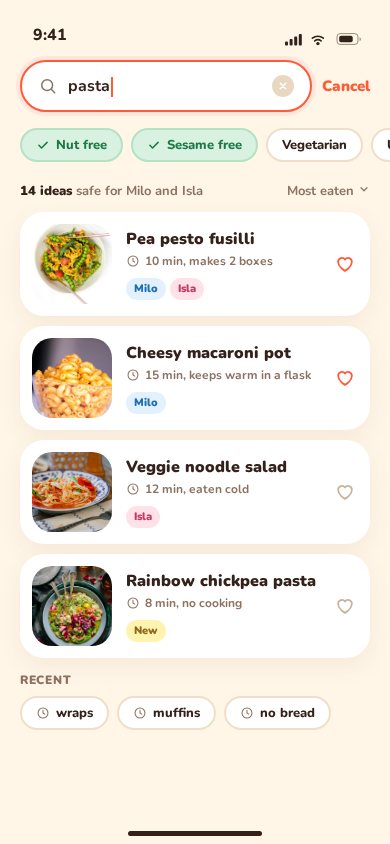
A search screen from Lunchbox, a school lunch planner for parents app template in a Playful style. Screen 9 of 25.
Lunchbox is a complete school lunch planner: welcome, adding your kids with allergies and school rules, sign in, a today screen with each child's bento box, a week plan, building a box compartment by compartment, smart swaps, ideas, search and recipes, the school's hot lunch menu, pantry, a shopping list with grocery checkout and confirmation, a morning packing mode with a timer and a packed screen, a camera to snap the box, the after school lunch report, a food group balance dashboard, a child profile, notifications, a Plus plan, profile and settings. Cream and white with tomato, sky and berry.
| Detail | Value |
|---|---|
| Screen type | Search |
| App | Lunchbox: School lunch planner for parents |
| Category | Food |
| Design language | Playful, light |
| Type | Bricolage Grotesque for headings, Nunito for text |
| Colours | #fff6e8 background, #ffffff surface, #33211a text, #8c7262 text-muted, #ff5b35 accent, #ffffff accent-contrast, #4aa8f0 secondary, #f0dfc8 border, #e5484d danger |
What this screen says
- pasta
- Cancel
- Nut free Sesame free Vegetarian Under 10 min
- 14 ideas safe for Milo and Isla Most eaten
- Pea pesto fusilli
- 10 min, makes 2 boxes
- Milo Isla
- Cheesy macaroni pot
- 15 min, keeps warm in a flask
- Milo
- Veggie noodle salad
- 12 min, eaten cold
- Isla
- Rainbow chickpea pasta
- 8 min, no cooking
- New
- Recent
- wraps muffins no bread
Around it in Lunchbox
More search and explore screens
- Crock Discover: Fermentation and sourdough starter log
- Curbside Map: Street food and food truck finder
- Forage Market: Farmers market and veg box
- Ember Cuts: Smoker and grill thermometer
- Steep Discover: Tea brewing and tasting notes
- Brigade Inventory: Restaurant kitchen and line ops
- Nibs Search: Food allergy and label scanner
- Ladle Search: Recipes and meal planning
- Pantry Aisles: Grocery delivery
- Brewly Search: Coffee ordering and loyalty
- Tabla Search: Tables worth dressing for
- Corked Shop: Wine journal and cellar
What makes a good search screen
- Show something before people type. Recent searches, popular items or categories make the empty search screen useful and save typing.
- Suggest as people type. Autocomplete with matching items, not only matching words, lets people jump straight to a result.
- Make filters visible and reversible. Show active filters as chips that can be removed in one tap, and the number of results as filters change.
- Forgive typos. Close matches and "Did you mean" stop a spelling mistake from ending in an empty screen.
The full search screen guide and every example
Remix Lunchbox free: describe your own app and it is drawn in this design. Or get its files from $10: Figma, React Native, SwiftUI, Flutter and HTML.