Templates · List and feed screens · Food app · Lunchbox
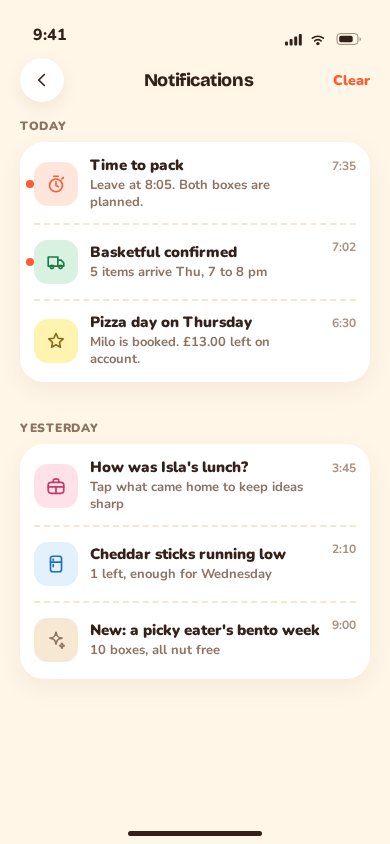
Lunchbox Notifications screen
A list screen from Lunchbox, a school lunch planner for parents app template in a Playful style. Screen 22 of 25.
Lunchbox is a complete school lunch planner: welcome, adding your kids with allergies and school rules, sign in, a today screen with each child's bento box, a week plan, building a box compartment by compartment, smart swaps, ideas, search and recipes, the school's hot lunch menu, pantry, a shopping list with grocery checkout and confirmation, a morning packing mode with a timer and a packed screen, a camera to snap the box, the after school lunch report, a food group balance dashboard, a child profile, notifications, a Plus plan, profile and settings. Cream and white with tomato, sky and berry.
| Detail | Value |
|---|---|
| Screen type | List |
| App | Lunchbox: School lunch planner for parents |
| Category | Food |
| Design language | Playful, light |
| Type | Bricolage Grotesque for headings, Nunito for text |
| Colours | #fff6e8 background, #ffffff surface, #33211a text, #8c7262 text-muted, #ff5b35 accent, #ffffff accent-contrast, #4aa8f0 secondary, #f0dfc8 border, #e5484d danger |
What this screen says
- NotificationsClear
- Today
- Time to pack
- Leave at 8:05. Both boxes are planned.
- Basketful confirmed
- 5 items arrive Thu, 7 to 8 pm
- Pizza day on Thursday
- Milo is booked. £13.00 left on account.
- Yesterday
- How was Isla's lunch?
- Tap what came home to keep ideas sharp
- Cheddar sticks running low
- 1 left, enough for Wednesday
- New: a picky eater's bento week
- 10 boxes, all nut free
Around it in Lunchbox
More list and feed screens
- Crumb Menu: Neighbourhood bakery
- Tiffin Restaurants: Food delivery
- Courier Deliveries: Food delivery driver app
- Picker Shop list: Grocery shopper app
- Queue Drinks: Join the waitlist from anywhere
- Nosh Menu: Local restaurant reviews
- Buns Deals: Burger chain ordering and deals
- Slice Menu: Pizza ordering with a live tracker
- Crate Menu: Meal kits delivered weekly
- Dash Aisle: Ten minute grocery delivery
- Aisle Weekly shop: Shared grocery lists
- Menu: Scan, order and pay at the table
What makes a good list screen
- Show what people need to decide. Each row should carry just enough to choose: a title, one or two details and a status. Everything else belongs on the detail screen.
- Keep rows consistent. The same information in the same place on every row lets people scan down a column instead of reading each item.
- Group with headings. Dates, categories or status headings break long lists into chunks people can skip through.
- Make common actions quick. Swipe actions, a checkbox or a heart on the row save opening the item for small tasks.
The full list screen guide and every example
Remix Lunchbox free: describe your own app and it is drawn in this design. Or get its files from $10: Figma, React Native, SwiftUI, Flutter and HTML.