Templates · List and feed screens · Fitness app · Locker
Locker Bookings screen
A list screen from Locker, a gym membership and class booking app template in a Brutalist style. Screen 12 of 25.
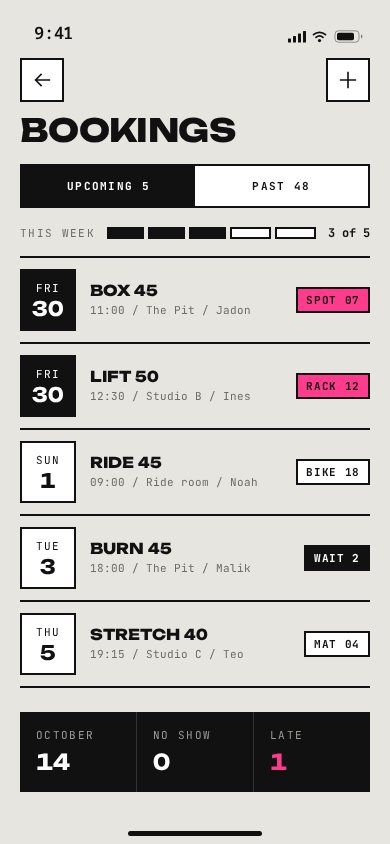
Locker is a complete gym membership app: welcome, home club and sign in, a home with the next class on a locker door and live club busyness, a door pass with your locker number, the timetable, search, class details, a studio floor plan to pick a spot, booking and confirmation, bookings, a live class timer, busy times, stats, coaches, clubs and a club page, locker rental, guest passes, membership plans, notifications, profile and settings. Concrete grey, black and one hot pink.
| Detail | Value |
|---|---|
| Screen type | List |
| App | Locker: Gym membership and class booking |
| Category | Health and fitness |
| Design language | Brutalist, light |
| Type | Unbounded for headings, JetBrains Mono for text |
| Colours | #e6e5df background, #ffffff surface, #111111 text, #6d6c66 text-muted, #ff3b8d accent, #111111 accent-contrast, #c5cbcd secondary, #111111 border, #e8401c danger |
What this screen says
- Bookings
- Upcoming 5 Past 48
- This week
- 3 of 5
- FRI 30
- Box 45
- 11:00 / The Pit / Jadon
- Spot 07
- Lift 50
- 12:30 / Studio B / Ines
- Rack 12
- SUN 1
- Ride 45
- 09:00 / Ride room / Noah
- Bike 18
- TUE 3
- Burn 45
- 18:00 / The Pit / Malik
- Wait 2
- THU 5
- Stretch 40
- 19:15 / Studio C / Teo
- Mat 04
- October 14
- No show 0
- Late 1
Around it in Locker
More list and feed screens
- Level Logbook: Glucose monitor companion
- Reformer Schedule: Pilates studio booking
- Sip History: Water intake and hydration
- Mend Plan: Physio and rehab exercises
- Tabata History: HIIT interval timer
- Jab History: Boxing workouts with a smart bag
- Exhale History: Breathwork sessions
- Bump Weeks: Pregnancy week by week
- Morsel Saved meals: AI calorie tracker
- Dew Routine: AI skin scan and routine
- Cradle Day: Baby tracker
- Medly Visits: Doctor on call
What makes a good list screen
- Show what people need to decide. Each row should carry just enough to choose: a title, one or two details and a status. Everything else belongs on the detail screen.
- Keep rows consistent. The same information in the same place on every row lets people scan down a column instead of reading each item.
- Group with headings. Dates, categories or status headings break long lists into chunks people can skip through.
- Make common actions quick. Swipe actions, a checkbox or a heart on the row save opening the item for small tasks.
The full list screen guide and every example
Remix Locker free: describe your own app and it is drawn in this design. Or get its files from $10: Figma, React Native, SwiftUI, Flutter and HTML.