Templates · Profile screens · Social app · Linkup
Linkup Member screen
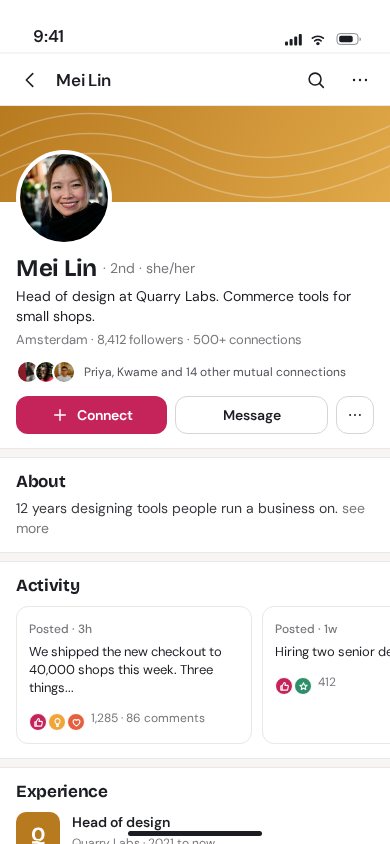
A profile screen from Linkup, a professional network and jobs app template in an Enterprise style. Screen 8 of 25.
Linkup is a complete professional network: welcome, goals and sign in, a home feed of posts with reactions, a post with its comments, writing a post, your profile with experience, another member's profile, skills with endorsements, my network with invitations, people search, jobs with recommendations and filtered results, a job with a quick apply flow, review and confirmation, an applications tracker, messages and a conversation, notifications, who viewed your profile, a company page, a Pro plan and settings. Warm white and graphite with a single raspberry.
| Detail | Value |
|---|---|
| Screen type | Profile |
| App | Linkup: Professional network and jobs |
| Category | Social |
| Design language | Enterprise, light |
| Type | Bricolage Grotesque for headings, DM Sans for text |
| Colours | #f6f5f3 background, #ffffff surface, #1c1d22 text, #7a767c text-muted, #c4245a accent, #fbe6ee accent-tint, #1c1d22 secondary, #f0a43a highlight, #ebe7e3 border, #2f8f6a success |
What this screen says
- Mei Lin
- Mei Lin · 2nd · she/her
- Head of design at Quarry Labs. Commerce tools for small shops.
- Amsterdam · 8,412 followers · 500+ connections
- Priya, Kwame and 14 other mutual connections
- Connect
- Message
- About
- 12 years designing tools people run a business on. see more
- Activity
- Posted · 3h
- We shipped the new checkout to 40,000 shops this week. Three things...
- 1,285 · 86 comments
- Posted · 1w
- Hiring two senior designers.
- Experience
- Head of designQuarry Labs · 2021 to now
Around it in Linkup
More profile screens
- Commons Profile: Friends, groups and events
- Tether Profile: Family location and safety
- Facet You: Video calls with family and friends
- Stoop Neighbour: Neighbourhood noticeboard
- Aura Profile: Moods with close friends
- Kindly Profile: Volunteering near you
- Cohort Alum: Alumni and mentor network
- Kin Member: Private family circle
- Confetti Profile: Party invites and RSVPs
- Ripple Profile: Voice notes social
- Duo Us: An app for two
- Soapbox Profile: Weekly debates and polls
Every social app profile screen
What makes a good profile screen
- Lead with identity. Photo, name and one line about the person at the top. It confirms whose profile this is.
- Show meaningful stats. Two to four numbers that matter in this app, like workouts, followers, books read or streak.
- Make editing obvious for the owner. An Edit profile button near the top, shown only on your own profile.
- Organise content with tabs. Posts, activity, saved or achievements as tabs keep a long profile tidy.
The full profile screen guide and every example
Remix Linkup free: describe your own app and it is drawn in this design. Or get its files from $10: Figma, React Native, SwiftUI, Flutter and HTML.