Templates · Profile screens · Social app · Commons
Commons Profile screen
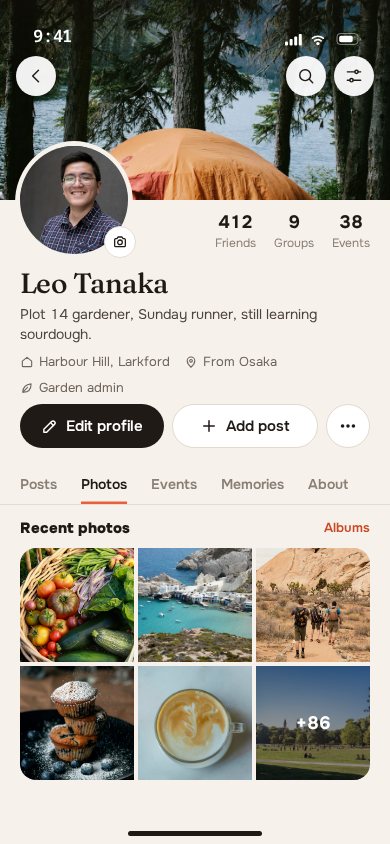
A profile screen from Commons, a social app template in a Minimal style. Screen 24 of 25.
Commons is a complete everyday social app: welcome, find friends, sign in, a feed with today circles, posts with reactions and threaded comments, a composer, search, friend requests and birthdays, groups and a group page with admin insights, events with tickets, checkout and a ticket stub, a new event form, a neighbourhood marketplace with a listing and a seller chat, messages, memories, notifications, a Plus plan, profile and settings. Warm oat and white with persimmon, pine and butter.
| Detail | Value |
|---|---|
| Screen type | Profile |
| App | Commons: Friends, groups and events |
| Category | Social |
| Design language | Minimal, light |
| Type | Fraunces for headings, Onest for text |
| Colours | #f6f1ea background, #ffffff surface, #201a16 text, #8a7f75 text-muted, #e8603c accent, #ffffff accent-contrast, #2e5e4e secondary, #ebe3d8 border, #d0402e danger |
What this screen says
- 412Friends
- 9Groups
- 38Events
- Leo Tanaka
- Plot 14 gardener, Sunday runner, still learning sourdough.
- Harbour Hill, Larkford From Osaka Garden admin
- Edit profile
- Add post
- Posts Photos Events Memories About
- Recent photosAlbums
Around it in Commons
More profile screens
- Banter Profile: Live messenger
- Natter Contact: Minimal messenger
- Nearly Profile: Dating by crossed paths
- Linkup Profile: Professional network and jobs
- Quorum Profile: Questions and expert answers
- Backer Creator: Support creators with memberships
- Pledge Creator: Back creative projects
- Civic Profile: Report issues and city services
- Guild Member: Community servers with voice and text chat
- Parrot Contact info: Private messaging, groups and calls
- Carrier Contact: Cloud messaging with channels
- Vista Profile: Photos, stories and reels
Every social app profile screen
What makes a good profile screen
- Lead with identity. Photo, name and one line about the person at the top. It confirms whose profile this is.
- Show meaningful stats. Two to four numbers that matter in this app, like workouts, followers, books read or streak.
- Make editing obvious for the owner. An Edit profile button near the top, shown only on your own profile.
- Organise content with tabs. Posts, activity, saved or achievements as tabs keep a long profile tidy.
The full profile screen guide and every example
Remix Commons free: describe your own app and it is drawn in this design. Or get its files from $10: Figma, React Native, SwiftUI, Flutter and HTML.