Templates · Dashboard and stats screens · Fitness app · Level
Level Insights screen
A dashboard screen from Level, a glucose monitor companion app template in a Clinical style. Screen 15 of 25.
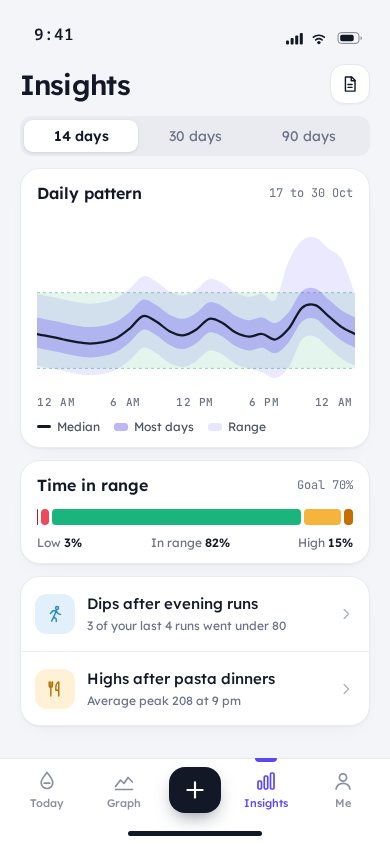
Level is a complete companion for a continuous glucose monitor: welcome, sign in, sensor pairing and target range setup, a today screen with the live reading in the level vial, a 24 hour graph, a single reading, logging carbs, insulin and exercise, a meal camera, a meal's glucose response, food search, the logbook, an urgent low alert, alert settings, 14 day insights with an ambulatory glucose profile, time in range, sensor life, a care team, a clinic report, a sensor refill checkout with confirmation, Level Plus, notifications, profile and settings. Cool white and ink navy with signal violet, range green, amber for highs and coral red for lows.
| Detail | Value |
|---|---|
| Screen type | Dashboard |
| App | Level: Glucose monitor companion |
| Category | Health and fitness |
| Design language | Clinical, light |
| Type | JetBrains Mono for headings, Lexend for text |
| Colours | #f4f5f8 background, #ffffff surface, #121826 text, #6b7285 text-muted, #5a48f5 accent, #ffffff accent-contrast, #19b57c secondary, #e6e8ef border, #ef4a5a danger |
What this screen says
- Insights
- 14 days 30 days 90 days
- Daily pattern
- 17 to 30 Oct
- 12 am 6 am 12 pm 6 pm 12 am
- Median Most days Range
- Time in range
- Goal 70%
- Low 3% In range 82% High 15%
- Dips after evening runs
- 3 of your last 4 runs went under 80
- Highs after pasta dinners
- Average peak 208 at 9 pm
- Today Graph Insights Me
Around it in Level
More dashboard and stats screens
- Lull Sleep: Sleep sounds and meditation
- Pace Activity: Fitness tracker
- Flexpass Activity: One membership, many studios
- Clinic Care overview: Find and book doctors
- Careline This month: Care for an ageing parent
- Velo Summary: Live and on-demand indoor cycling
- Vantage Energy reserve: Sports watch companion
- Labwork Report: Book blood tests and see results
- Segment Progress: Runs and rides with friends
- Nightly Sleep: Smart ring sleep and readiness
- Pillbox Week: Pharmacy refills and medicine reminders
- Rise Trends: Alarm clock and sleep cycles
Every fitness app dashboard screen
What makes a good dashboard screen
- One headline number. The figure that matters most, like balance, steps or revenue, large at the top with its change since the last period.
- Give numbers context. Compared with last week, against a goal or as a trend line. A number alone does not say if it is good.
- Pick simple charts. Bars for comparing periods, lines for trends and rings for progress toward a goal. Avoid charts that need a legend to read.
- Let people change the period. Day, week, month and year as a segmented control above the chart.
The full dashboard screen guide and every example
Remix Level free: describe your own app and it is drawn in this design. Or get its files from $10: Figma, React Native, SwiftUI, Flutter and HTML.