Templates · Dashboard and stats screens · Fitness app · Pillbox
Pillbox Week screen
A dashboard screen from Pillbox, a pharmacy refills and medicine reminders app template in a Clinical style. Screen 6 of 25.
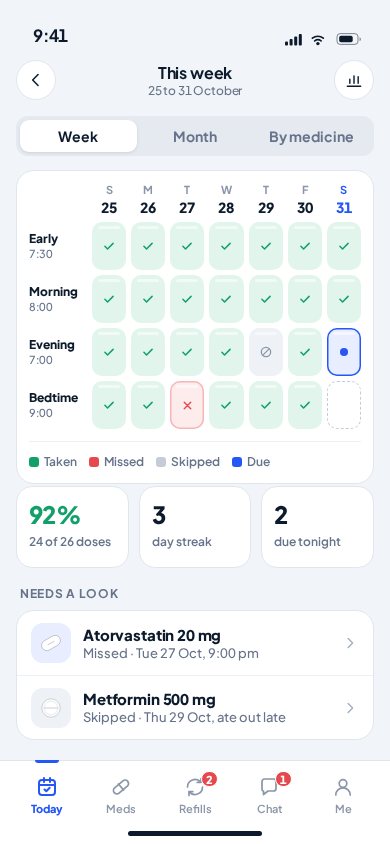
Pillbox is a complete pharmacy and medicine app: welcome, sign in and a text code, a today timeline of doses to take or skip, a dose sheet, a weekly pillbox grid, a medicine cabinet, a medicine page with its label and supply, adding a medicine by scanning the label, a dose schedule, an interaction check, refills ready to order, pickup or delivery, choosing a store on a map, order review, a placed order, live delivery tracking, a pickup code, a chat with the pharmacist, an adherence report, notifications, a Plus plan, a family profile and settings. Cool grey and white with cobalt, amber and a calm green for taken.
| Detail | Value |
|---|---|
| Screen type | Dashboard |
| App | Pillbox: Pharmacy refills and medicine reminders |
| Category | Health and fitness |
| Design language | Clinical, light |
| Type | Plus Jakarta Sans |
| Colours | #f1f4f8 background, #ffffff surface, #0c1a2b text, #66738a text-muted, #2457f5 accent, #ffffff accent-contrast, #f2a516 secondary, #e1e6ee border, #e5484d danger |
What this screen says
- This week25 to 31 October
- Week Month By medicine
- S25 M26 T27 W28 T29 F30 S31
- Early7:30
- Morning8:00
- Evening7:00
- Bedtime9:00
- Taken Missed Skipped Due
- 92%24 of 26 doses
- 3day streak
- 2due tonight
- Needs a look
- Atorvastatin 20 mg
- Missed · Tue 27 Oct, 9:00 pm
- Metformin 500 mg
- Skipped · Thu 29 Oct, ate out late
- Today
- Meds
- 2 Refills
- 1 Chat
- Me
Around it in Pillbox
More dashboard and stats screens
- Ward Trend: Patient portal for results, visits and messages
- Level Graph: Glucose monitor companion
- Reformer Progress: Pilates studio booking
- Sip Insights: Water intake and hydration
- Mend Progress: Physio and rehab exercises
- Tabata Stats: HIIT interval timer
- Jab Stats: Boxing workouts with a smart bag
- Exhale Insights: Breathwork sessions
- Bump Trends: Pregnancy week by week
- Locker Busy times: Gym membership and class booking
- Morsel Progress: AI calorie tracker
- Dew Skin report: AI skin scan and routine
Every fitness app dashboard screen
What makes a good dashboard screen
- One headline number. The figure that matters most, like balance, steps or revenue, large at the top with its change since the last period.
- Give numbers context. Compared with last week, against a goal or as a trend line. A number alone does not say if it is good.
- Pick simple charts. Bars for comparing periods, lines for trends and rings for progress toward a goal. Avoid charts that need a legend to read.
- Let people change the period. Day, week, month and year as a segmented control above the chart.
The full dashboard screen guide and every example
Remix Pillbox free: describe your own app and it is drawn in this design. Or get its files from $10: Figma, React Native, SwiftUI, Flutter and HTML.