Templates · Paywall screens · Productivity app · Lectern
Lectern Pro screen
A paywall screen from Lectern, a slides and presenter remote app template in a Dark-first style. Screen 22 of 25.
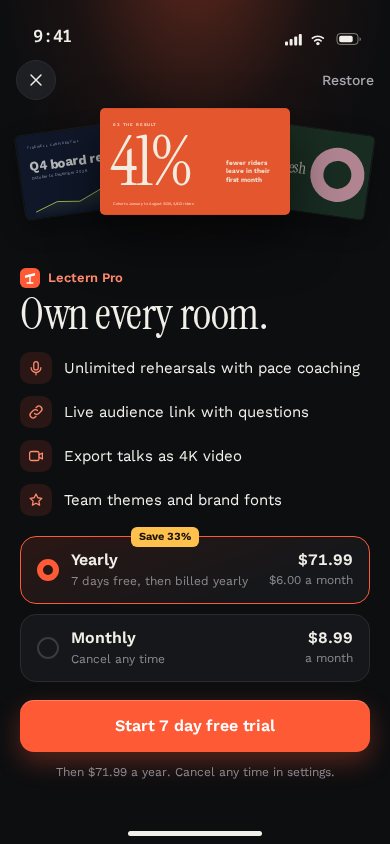
Lectern is a complete slides app: welcome, sign in, a deck gallery with the next talk, search across slides and notes, themes for a new deck, a deck page, the slide navigator, a slide editor with text format, layouts, chart data and builds, comments, rehearsal with a live timer and a report, connecting to a screen, presenter view with notes, the phone as a remote and laser, share, export and a ready file, a Pro plan, activity, profile and settings. Graphite backstage, cream paper slides and a laser vermilion.
| Detail | Value |
|---|---|
| Screen type | Paywall |
| App | Lectern: Slides and presenter remote |
| Category | Productivity |
| Design language | Dark-first, dark |
| Type | Instrument Serif for headings, Work Sans for text |
| Colours | #0d0e10 background, #16171a surface, #f2efe9 text, #8e8c93 text-muted, #ff5a36 accent, #ffffff accent-contrast, #f2ece0 secondary, #2a2b30 border, #ffc14d warning, #5ad1b0 success |
What this screen says
- Restore
- Lectern Pro
- Own every room.
- Unlimited rehearsals with pace coaching
- Live audience link with questions
- Export talks as 4K video
- Team themes and brand fonts
- Yearly
- 7 days free, then billed yearly
- $71.99$6.00 a monthSave 33%
- Monthly
- Cancel any time
- $8.99a month
- Start 7 day free trial
- Then $71.99 a year. Cancel any time in settings.
Around it in Lectern
More paywall screens
- Token Plus: Two-factor codes and sign-in approvals
- Beam Plus: Send big files
- Parchment Pro: Documents, edit and share
- Ringer Plus: Phone, contacts and voicemail
- Pipeline Pro: Sales CRM on the road
- Aim Teams: Goals and key results
- Scribe Pro: Voice memos to notes
- Inkline Plans: Sign and send contracts
- Dispatch Teams: Field service jobs for technicians
- Stash Plus: Read-it-later and highlights
- Uptime Team: Server and site monitoring
- Branch Plus: Mind maps
Every productivity app paywall screen
What makes a good paywall screen
- Lead with the outcome, not the feature list. The headline should say what changes for the person: "Train smarter every week" beats "Unlock Premium". Three to five benefits underneath are enough; more turns into a wall of ticks nobody reads.
- Show the real price, period and trial terms. State the price, how often it renews and when a free trial turns into a charge, near the button. Apple's App Store guideline 3.1.2 asks subscription apps to make this clear before purchase, and Google Play has similar rules.
- One primary button. The main call to action should be impossible to miss and say what happens: "Start 7-day free trial" or "Subscribe for $4.99/month". A second plan choice is fine; a second competing button is not.
- Make the plans easy to compare. When you offer monthly and yearly, show both prices in the same unit (per month or per week) and mark the saving on the yearly plan in plain numbers, not just a badge.
The full paywall screen guide and every example
Remix Lectern free: describe your own app and it is drawn in this design. Or get its files from $10: Figma, React Native, SwiftUI, Flutter and HTML.