Templates · Onboarding screens · Finance app · Lease
Lease Find your home screen
An onboarding screen from Lease, a finance app template in an Enterprise style. Screen 3 of 25.
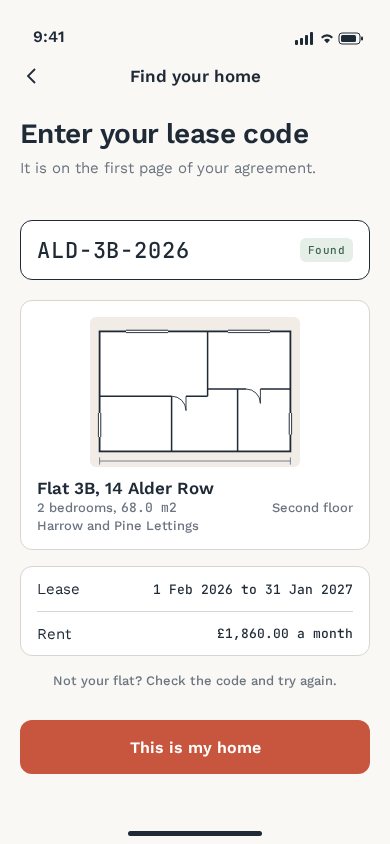
Lease is lease keeps a tenancy in order. The home screen is a drawn floor plan of the flat with rent, repairs and inspections pinned to it. Rent is paid and split between flatmates with receipt stubs, repairs run on a ticket with a status rail, and the lease, inventory and deposit live as document sheets. It also covers booking an inspection, yearly costs, search, notifications, a Lease Plus plan, profile and settings.
| Detail | Value |
|---|---|
| Screen type | Onboarding |
| App | Lease: Your tenancy, drawn to plan |
| Category | Finance |
| Design language | Enterprise, light |
| Type | Work Sans |
| Colours | #faf8f5 background, #ffffff surface, #1f2a37 text, #6b7480 text-muted, #c8553d accent, #ffffff accent-contrast, #7fa089 secondary, #d9d5ce border, #b3261e danger |
What this screen says
- Find your home
- Enter your lease code
- It is on the first page of your agreement.
- ALD-3B-2026 Found
- Flat 3B, 14 Alder Row
- 2 bedrooms, 68.0 m2 Second floor
- Harrow and Pine Lettings
- Lease 1 Feb 2026 to 31 Jan 2027
- Rent £1,860.00 a month
- Not your flat? Check the code and try again.
- This is my home
Around it in Lease
More onboarding screens
- Giftly Welcome: Gift cards, sent and stored
- Zap Welcome: Pay friends with a note
- Billfold Welcome: Cards, passes and tickets wallet
- Payly Welcome: UPI payments, recharges and bills
- Crest Welcome: Credit card bills and rewards
- Storefront Welcome: Run your online store
- Bastion Welcome: Everyday banking from a big bank
- Later Welcome: Buy now, pay in four
- Standing Welcome: Credit score and reports
- Accrue Welcome: Retirement and pension planner
- Levy Welcome: Taxes for freelancers
- Bullion Welcome: Gold and silver savings
Every finance app onboarding screen
What makes a good onboarding screen
- One idea per screen. Each screen should say one thing in a headline people can read in a second. If a screen needs a paragraph, it is doing too much.
- Personalise with a purpose. Ask a question only if the answer changes what people see next, like a goal, a level or an interest. Then show that the answer mattered.
- Explain permissions before asking. Show your own screen saying why you need notifications, location or the camera before the system prompt. People who understand the reason are more likely to allow it.
- Let people skip. A visible skip or "I'll do this later" respects returning users and the impatient. Make sure skipping still lands them somewhere useful.
The full onboarding screen guide and every example
Remix Lease free: describe your own app and it is drawn in this design. Or get its files from $10: Figma, React Native, SwiftUI, Flutter and HTML.