Templates · Form and input screens · Productivity app · Layout
Layout Colours screen
A form screen from Layout, a design anything from templates app template in a Playful style. Screen 11 of 25.
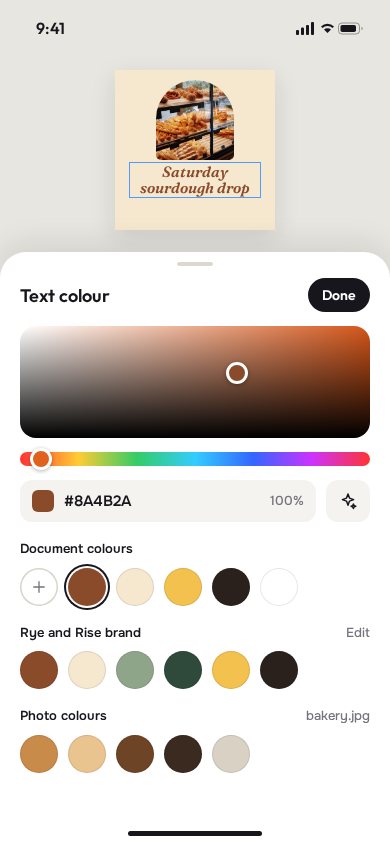
Layout is a complete everyday design app: welcome and first run, sign in, a home with search, design types and recent work, template search and a template page, a canvas editor with a floating text toolbar, fonts, colours, elements, uploads, layers and pages, resize and copy, a brand kit, comments with pins, share, download and a saved screen, projects, insights with a content planner, notifications, a Pro plan, profile and settings. Warm stone and white with ink buttons and pink, butter, mint and sky shapes.
| Detail | Value |
|---|---|
| Screen type | Form |
| App | Layout: Design anything from templates |
| Category | Productivity |
| Design language | Playful, light |
| Type | Outfit for headings, Onest for text |
| Colours | #f4f3ef background, #ffffff surface, #17161c text, #76737c text-muted, #ff6a9e accent, #17161c accent-contrast, #ffc531 secondary, #ebe8e0 border, #e5484d danger |
What this screen says
- Saturday
- sourdough drop
- Text colour
- Done
- #8A4B2A100%
- Document colours
- Rye and Rise brandEdit
- Photo coloursbakery.jpg
Around it in Layout
More form and input screens
- Daybook New event: Calendar and planner
- Scanly Sign: Document scanner
- Keyring New item: Password manager
- Rota Swap shift: Shift scheduling for hourly teams
- Inkwell Write: Daily journal
- Shortlist Filters: Job search and application tracker
- Parley Create group: Team messenger
- Docket New task: Task and sprint planner
- Kanso New task: Tasks, calendar and chat
- Margin Edit note: AI note taking
- Aide Command: Executive AI assistant
- Juno New chat: AI chat assistant
Every productivity app form screen
What makes a good form screen
- Ask only what you need. Every field is a reason to stop. Remove optional fields or move them to later.
- Labels above fields. Visible labels stay readable while people type; placeholder-only labels disappear.
- Use the right keyboard and input. Number pads for amounts, email keyboards for email, pickers for dates and autofill for addresses and codes.
- Validate as people go. Show problems next to the field when people leave it, in words that say how to fix them.
The full form screen guide and every example
Remix Layout free: describe your own app and it is drawn in this design. Or get its files from $10: Figma, React Native, SwiftUI, Flutter and HTML.