Templates · Detail screens · Productivity app · Layout
Layout Brand kit screen
A detail screen from Layout, a design anything from templates app template in a Playful style. Screen 15 of 25.
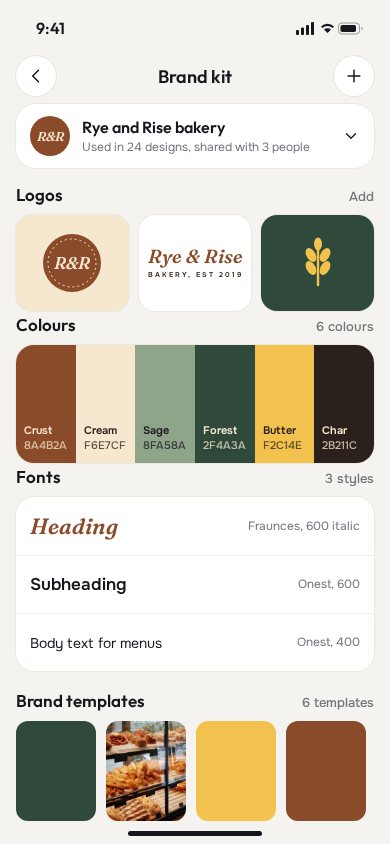
Layout is a complete everyday design app: welcome and first run, sign in, a home with search, design types and recent work, template search and a template page, a canvas editor with a floating text toolbar, fonts, colours, elements, uploads, layers and pages, resize and copy, a brand kit, comments with pins, share, download and a saved screen, projects, insights with a content planner, notifications, a Pro plan, profile and settings. Warm stone and white with ink buttons and pink, butter, mint and sky shapes.
| Detail | Value |
|---|---|
| Screen type | Detail |
| App | Layout: Design anything from templates |
| Category | Productivity |
| Design language | Playful, light |
| Type | Outfit for headings, Onest for text |
| Colours | #f4f3ef background, #ffffff surface, #17161c text, #76737c text-muted, #ff6a9e accent, #17161c accent-contrast, #ffc531 secondary, #ebe8e0 border, #e5484d danger |
What this screen says
- Brand kit
- R&R
- Rye and Rise bakeryUsed in 24 designs, shared with 3 people
- LogosAdd
- Colours6 colours
- Crust8A4B2A
- CreamF6E7CF
- Sage8FA58A
- Forest2F4A3A
- ButterF2C14E
- Char2B211C
- Fonts3 styles
- Heading Fraunces, 600 italic
- Subheading Onest, 600
- Body text for menus Onest, 400
- Brand templates6 templates
Around it in Layout
More detail screens
- Swarm Torrent: Torrent client
- Bench Portfolio item: Freelance marketplace
- Convene Meeting details: Video meetings
- Unplug Blocked: Screen time blocker
- Streak Habit: Small days, long chains
- Deskly Desk: Hybrid office booking
- Pomo Task: Focus timer
- Postbox Thread: Email for busy teams
- Daybook Event: Calendar and planner
- Scanly Document: Document scanner
- Keyring Login: Password manager
- Rota Shift detail: Shift scheduling for hourly teams
Every productivity app detail screen
What makes a good detail screen
- Lead with what identifies the item. A large image or title, the price or status, and the key facts at the top. People should know they are in the right place at a glance.
- Keep the main action visible. A sticky bottom button for Add to cart, Book or Play stays reachable while people scroll through details.
- Order information by importance. The facts that decide the choice come first; reviews, specifications and fine print further down.
- Use progressive disclosure. Long descriptions, specifications and policies can expand on tap rather than filling the screen.
The full detail screen guide and every example
Remix Layout free: describe your own app and it is drawn in this design. Or get its files from $10: Figma, React Native, SwiftUI, Flutter and HTML.