Templates · List and feed screens · Sports app · Lapse
Lapse Training plans screen
A list screen from Lapse, a swim training app template in a Glass style. Screen 17 of 25.
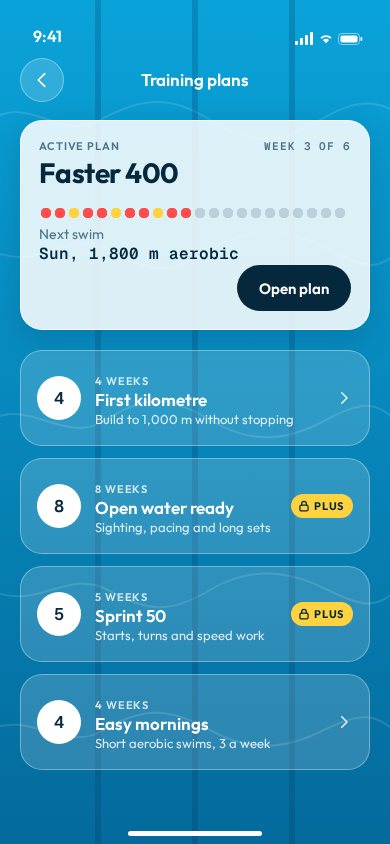
Lapse is a complete swim training app seen from above the water: welcome, sign in, setting up your pool, a home with this morning's swim and the week's distance, logging a set, a session with lap splits and stroke rate, a pace clock, a pool finder with lane availability, technique drills, training plans, a swim log, personal bests, a weekly goal, a Plus plan, notifications, profile and settings. Everything is drawn: lane lines, ropes, a pace clock dial and stroke pictograms.
| Detail | Value |
|---|---|
| Screen type | List |
| App | Lapse: Swim training |
| Category | Sports |
| Design language | Glass, light |
| Type | Outfit |
| Colours | #0aa3d9 background, #ffffff surface, #06283d text, #4d7186 text-muted, #ff4d4d accent, #ffffff accent-contrast, #ffd23f secondary, #046a9c border, #ff4d4d danger |
What this screen says
- Training plans
- Active plan Week 3 of 6
- Faster 400
- Next swimSun, 1,800 m aerobic
- Open plan
- 4 weeks
- First kilometre
- Build to 1,000 m without stopping
- 8 weeks
- Open water ready
- Sighting, pacing and long sets
- PLUS
- 5 weeks
- Sprint 50
- Starts, turns and speed work
- Easy mornings
- Short aerobic swims, 3 a week
Around it in Lapse
More list and feed screens
- Angler Catch log: A fishing log drawn on the depth chart
- Piste Notifications: Ski resort companion
- Crag Routes: Climbing gym logbook
- Fairway Notifications: Golf course guide and scorecard
- Matchday Notifications: Football scores and fantasy
- Rally Notifications: Tennis and padel club
- Swell Week ahead: Surf forecast
- Pitwall Timing: Race engineering
- Elevens Matches: Fantasy cricket leagues
- Scoreboard Play by play: Scores and news for every sport
- Bib Calendar: Find and enter races
- Wicket Commentary: Live cricket scores
What makes a good list screen
- Show what people need to decide. Each row should carry just enough to choose: a title, one or two details and a status. Everything else belongs on the detail screen.
- Keep rows consistent. The same information in the same place on every row lets people scan down a column instead of reading each item.
- Group with headings. Dates, categories or status headings break long lists into chunks people can skip through.
- Make common actions quick. Swipe actions, a checkbox or a heart on the row save opening the item for small tasks.
The full list screen guide and every example
Remix Lapse free: describe your own app and it is drawn in this design. Or get its files from $10: Figma, React Native, SwiftUI, Flutter and HTML.