Templates · Live tracking screens · Food app · Ladle
Ladle Timer screen
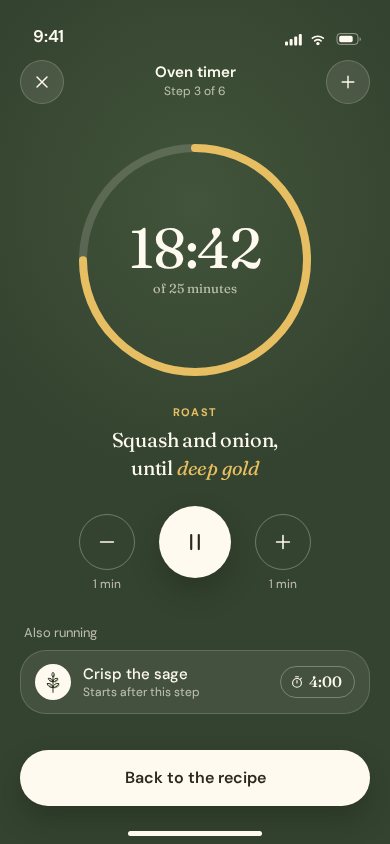
A tracking screen from Ladle, a recipes and meal planning app template in a Minimal style. Screen 10 of 25.
Ladle is a complete recipe and meal planning app: onboarding and taste picks, sign in, a home with tonight's dinner, search, a recipe with scalable ingredients, a step by step cook mode with timers, a week planner, one shopping list sorted by aisle, a pantry with use it up ideas, collections, nutrition, a recipe editor, a plan, notifications, profile and settings. Cream, sage and terracotta with arch and circle photo crops.
| Detail | Value |
|---|---|
| Screen type | Tracking |
| App | Ladle: Recipes and meal planning |
| Category | Food |
| Design language | Minimal, light |
| Type | DM Sans |
| Colours | #f5eedf background, #fffaf0 surface, #2b2a22 text, #857f6c text-muted, #4f6146 accent, #fffaf0 accent-contrast, #c4623c secondary, #e2d7c0 border, #b3402e danger |
What this screen says
- Oven timerStep 3 of 6
- 18:42of 25 minutes
- Roast
- Squash and onion,
- until deep gold
- 1 min
- Also running
- Crisp the sageStarts after this step
- Back to the recipe
Around it in Ladle
More live tracking screens
- Picker Deliver: Grocery shopper app
- Queue In line: Join the waitlist from anywhere
- Nosh Waitlist: Local restaurant reviews
- Buns Order code: Burger chain ordering and deals
- Slice Tracker: Pizza ordering with a live tracker
- Crate Delivery: Meal kits delivered weekly
- Dash Track order: Ten minute grocery delivery
- Aisle In store: Shared grocery lists
- Menu Order status: Scan, order and pay at the table
- Mart Aisle map: Supermarket app with loyalty and scan and go
- Rescue Pickup: Surprise bags of surplus food
- Omakase At the counter: Chef's counter reservations
Every food app tracking screen
What makes a good live tracking screen
- The live number is the hero. Arrival time, pace, distance or time left, in large type at the top or centre.
- Show status in words. "Driver is 3 minutes away" or "Halfway there" alongside the map or chart.
- Make it readable while moving. Large numbers, high contrast and big buttons for pause, stop or call.
- Keep updates calm. Smooth movement on the map and steady numbers; jumpy updates feel broken.
The full live tracking screen guide and every example
Remix Ladle free: describe your own app and it is drawn in this design. Or get its files from $10: Figma, React Native, SwiftUI, Flutter and HTML.