Templates · Detail screens · Finance app · Keystone
Keystone Rate offer screen
A detail screen from Keystone, a mortgage and home loan tracker app template in an Enterprise style. Screen 15 of 25.
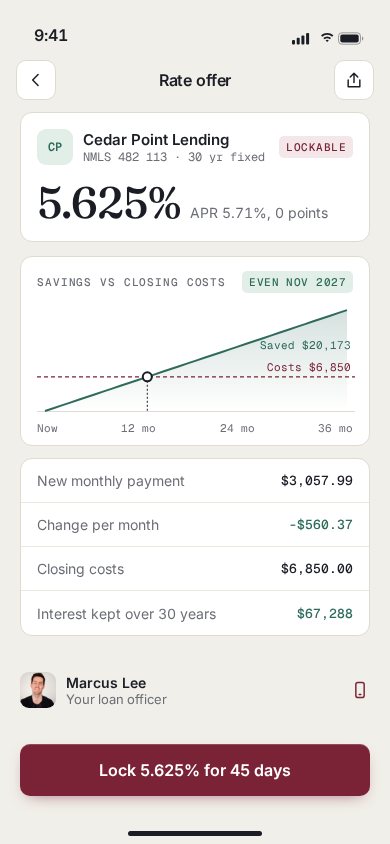
Keystone is a complete home loan tracker: welcome, sign in and linking a lender, a home with the equity arch and the next payment, loan details, the full amortization schedule, a payment breakdown and history, making a payment with extra principal, review and confirmation, a payoff planner, refinance offers with a break-even chart, a live rate lock, home value, property, escrow, equity and PMI removal, documents and a statement viewer, a Pro plan, notifications, profile and settings. Limestone and white with oxblood, verdigris and ochre.
| Detail | Value |
|---|---|
| Screen type | Detail |
| App | Keystone: Mortgage and home loan tracker |
| Category | Finance |
| Design language | Enterprise, light |
| Type | Fraunces for headings, Inter for text |
| Colours | #f1efe9 background, #ffffff surface, #1a1d24 text, #6c6e76 text-muted, #7a2236 accent, #ffffff accent-contrast, #2e6b5b secondary, #dfdbd1 border, #b4361f danger |
What this screen says
- Rate offer
- CP
- Cedar Point Lending
- NMLS 482 113 · 30 yr fixed
- LOCKABLE
- 5.625%APR 5.71%, 0 points
- Savings vs closing costs EVEN NOV 2027
- Now 12 mo 24 mo 36 mo
- New monthly payment $3,057.99
- Change per month -$560.37
- Closing costs $6,850.00
- Interest kept over 30 years $67,288
- Marcus LeeYour loan officer
- Lock 5.625% for 45 days
Around it in Keystone
More detail screens
- Storefront Order: Run your online store
- Bastion Checking: Everyday banking from a big bank
- Later Store: Buy now, pay in four
- Standing Card use: Credit score and reports
- Accrue Pot: Retirement and pension planner
- Levy Payment: Taxes for freelancers
- Bullion Gold: Gold and silver savings
- Wage Shift: Get paid as you work
- Rebate Card: Cashback card and rewards
- Aegis Auto policy: Insurance policies and claims
- Till Receipt: Card reader and sales for small shops
- Strike Stock: Options trading
Every finance app detail screen
What makes a good detail screen
- Lead with what identifies the item. A large image or title, the price or status, and the key facts at the top. People should know they are in the right place at a glance.
- Keep the main action visible. A sticky bottom button for Add to cart, Book or Play stays reachable while people scroll through details.
- Order information by importance. The facts that decide the choice come first; reviews, specifications and fine print further down.
- Use progressive disclosure. Long descriptions, specifications and policies can expand on tap rather than filling the screen.
The full detail screen guide and every example
Remix Keystone free: describe your own app and it is drawn in this design. Or get its files from $10: Figma, React Native, SwiftUI, Flutter and HTML.