Templates · List and feed screens · Finance app · Keystone
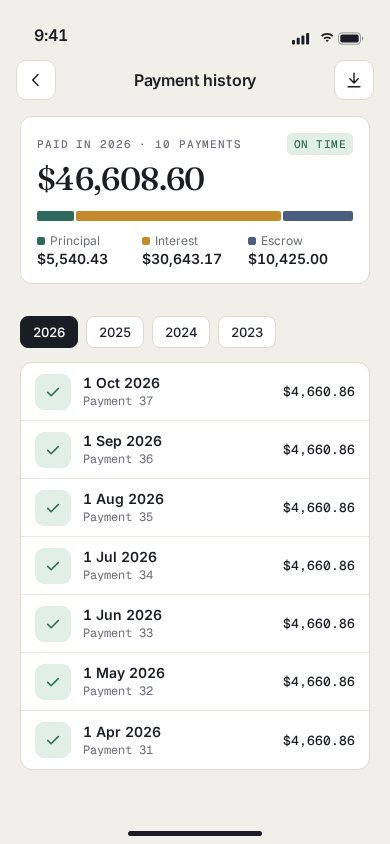
Keystone Payment history screen
A list screen from Keystone, a mortgage and home loan tracker app template in an Enterprise style. Screen 8 of 25.
Keystone is a complete home loan tracker: welcome, sign in and linking a lender, a home with the equity arch and the next payment, loan details, the full amortization schedule, a payment breakdown and history, making a payment with extra principal, review and confirmation, a payoff planner, refinance offers with a break-even chart, a live rate lock, home value, property, escrow, equity and PMI removal, documents and a statement viewer, a Pro plan, notifications, profile and settings. Limestone and white with oxblood, verdigris and ochre.
| Detail | Value |
|---|---|
| Screen type | List |
| App | Keystone: Mortgage and home loan tracker |
| Category | Finance |
| Design language | Enterprise, light |
| Type | Fraunces for headings, Inter for text |
| Colours | #f1efe9 background, #ffffff surface, #1a1d24 text, #6c6e76 text-muted, #7a2236 accent, #ffffff accent-contrast, #2e6b5b secondary, #dfdbd1 border, #b4361f danger |
What this screen says
- Payment history
- Paid in 2026 · 10 payments ON TIME
- Principal
- Interest
- Escrow
- 1 Oct 2026
- Payment 37
- 1 Sep 2026
- Payment 36
- 1 Aug 2026
- Payment 35
- 1 Jul 2026
- Payment 34
- 1 Jun 2026
- Payment 33
- 1 May 2026
- Payment 32
- 1 Apr 2026
- Payment 31
Around it in Keystone
More list and feed screens
- Halden Transactions: Premium neobank
- Billable Today: Time tracking and invoices, kept like a ledger
- Lease Receipts: Your tenancy, drawn to plan
- Claim Expenses: Expenses, filed like a till receipt
- Tally Notifications: Monthly budgeting
- Divvy Notifications: Split bills with friends
- Ticker Movers: Stock investing
- Burrow Notifications: Shared savings pots
- Remit Notifications: International money transfer
- Piggy Chores: Pocket money for kids
- Settle Notifications: Bill payments and banking
- Fathom Notifications: Crypto wallet
What makes a good list screen
- Show what people need to decide. Each row should carry just enough to choose: a title, one or two details and a status. Everything else belongs on the detail screen.
- Keep rows consistent. The same information in the same place on every row lets people scan down a column instead of reading each item.
- Group with headings. Dates, categories or status headings break long lists into chunks people can skip through.
- Make common actions quick. Swipe actions, a checkbox or a heart on the row save opening the item for small tasks.
The full list screen guide and every example
Remix Keystone free: describe your own app and it is drawn in this design. Or get its files from $10: Figma, React Native, SwiftUI, Flutter and HTML.