Templates · Form and input screens · Finance app · Keel
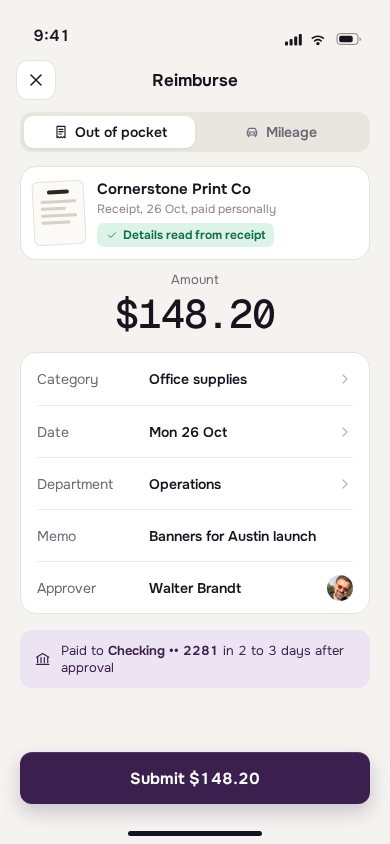
Keel Reimburse screen
A form screen from Keel, a corporate cards and spend controls app template in an Enterprise style. Screen 18 of 25.
Keel is a complete corporate card and spend app: welcome, work email sign in and a code, a home with your card, its limit rail and the to-dos, physical and vendor-locked virtual cards with controls, a new card request with approval, activity with missing receipts, a transaction with its policy check, a receipt camera with auto-match, a manager approvals inbox, spend by department, policies, reimbursements, bill pay with a scheduled payment, notifications, a Plus plan, profile and settings. Stone and white with deep aubergine, mint and amber.
| Detail | Value |
|---|---|
| Screen type | Form |
| App | Keel: Corporate cards and spend controls |
| Category | Finance |
| Design language | Enterprise, light |
| Type | Geist Mono for headings, Onest for text |
| Colours | #f4f3f0 background, #ffffff surface, #17141f text, #6c6875 text-muted, #3b1f4e accent, #ffffff accent-contrast, #5fd6a4 secondary, #e6e3dd border, #d9533f danger |
What this screen says
- Reimburse
- Out of pocket
- Mileage
- Cornerstone Print CoReceipt, 26 Oct, paid personally Details read from receipt
- Amount
- Category Office supplies
- Date Mon 26 Oct
- Department Operations
- Memo Banners for Austin launch
- Approver Walter Brandt
- Paid to Checking •• 2281 in 2 to 3 days after approval
- Submit $148.20
Around it in Keel
More form and input screens
- Giftly Card design: Gift cards, sent and stored
- Zap Pay: Pay friends with a note
- Billfold Verify card: Cards, passes and tickets wallet
- Payly Amount: UPI payments, recharges and bills
- Crest Add card: Credit card bills and rewards
- Storefront Fulfil items: Run your online store
- Bastion Transfer: Everyday banking from a big bank
- Later Pay early: Buy now, pay in four
- Standing Dispute: Credit score and reports
- Accrue Contributions: Retirement and pension planner
- Levy Log expense: Taxes for freelancers
- Bullion Buy gold: Gold and silver savings
What makes a good form screen
- Ask only what you need. Every field is a reason to stop. Remove optional fields or move them to later.
- Labels above fields. Visible labels stay readable while people type; placeholder-only labels disappear.
- Use the right keyboard and input. Number pads for amounts, email keyboards for email, pickers for dates and autofill for addresses and codes.
- Validate as people go. Show problems next to the field when people leave it, in words that say how to fix them.
The full form screen guide and every example
Remix Keel free: describe your own app and it is drawn in this design. Or get its files from $10: Figma, React Native, SwiftUI, Flutter and HTML.