Templates · Profile screens · Finance app · Keel
Keel Profile screen
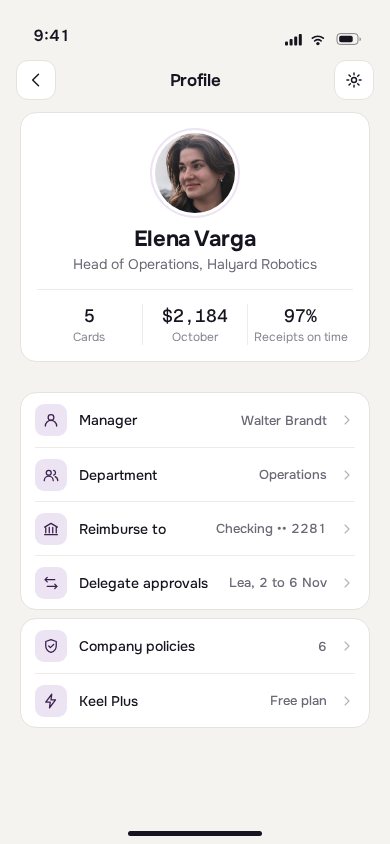
A profile screen from Keel, a corporate cards and spend controls app template in an Enterprise style. Screen 24 of 25.
Keel is a complete corporate card and spend app: welcome, work email sign in and a code, a home with your card, its limit rail and the to-dos, physical and vendor-locked virtual cards with controls, a new card request with approval, activity with missing receipts, a transaction with its policy check, a receipt camera with auto-match, a manager approvals inbox, spend by department, policies, reimbursements, bill pay with a scheduled payment, notifications, a Plus plan, profile and settings. Stone and white with deep aubergine, mint and amber.
| Detail | Value |
|---|---|
| Screen type | Profile |
| App | Keel: Corporate cards and spend controls |
| Category | Finance |
| Design language | Enterprise, light |
| Type | Geist Mono for headings, Onest for text |
| Colours | #f4f3f0 background, #ffffff surface, #17141f text, #6c6875 text-muted, #3b1f4e accent, #ffffff accent-contrast, #5fd6a4 secondary, #e6e3dd border, #d9533f danger |
What this screen says
- Profile
- Elena Varga
- Head of Operations, Halyard Robotics
- 5Cards
- $2,184October
- 97%Receipts on time
- Manager Walter Brandt
- Department Operations
- Reimburse to Checking •• 2281
- Delegate approvals Lea, 2 to 6 Nov
- Company policies 6
- Keel Plus Free plan
Around it in Keel
More profile screens
- Envelope Profile: Give every dollar a job
- Recur Profile: Track and cancel subscriptions
- Giftly Profile: Gift cards, sent and stored
- Zap Friend: Pay friends with a note
- Billfold Profile: Cards, passes and tickets wallet
- Payly Profile: UPI payments, recharges and bills
- Crest Profile: Credit card bills and rewards
- Storefront Customer: Run your online store
- Bastion Profile: Everyday banking from a big bank
- Later You: Buy now, pay in four
- Standing Profile: Credit score and reports
- Accrue Profile: Retirement and pension planner
Every finance app profile screen
What makes a good profile screen
- Lead with identity. Photo, name and one line about the person at the top. It confirms whose profile this is.
- Show meaningful stats. Two to four numbers that matter in this app, like workouts, followers, books read or streak.
- Make editing obvious for the owner. An Edit profile button near the top, shown only on your own profile.
- Organise content with tabs. Posts, activity, saved or achievements as tabs keep a long profile tidy.
The full profile screen guide and every example
Remix Keel free: describe your own app and it is drawn in this design. Or get its files from $10: Figma, React Native, SwiftUI, Flutter and HTML.