Templates · List and feed screens · Fitness app · Jab
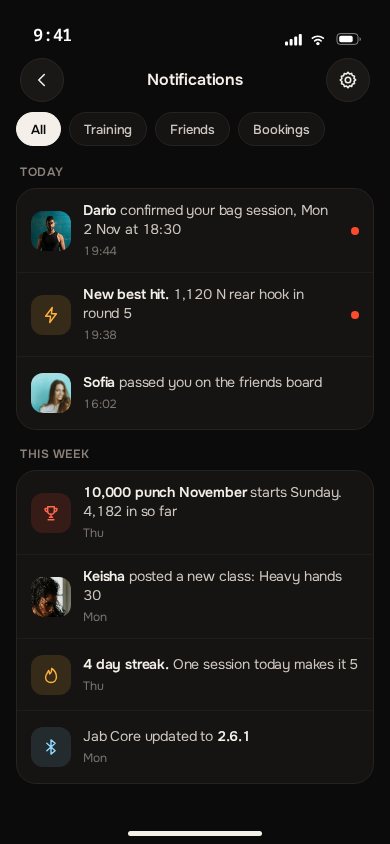
Jab Notifications screen
A list screen from Jab, a health and fitness app template in a Dark-first style. Screen 23 of 25.
Jab is a complete smart bag boxing app: welcome, pairing the bag sensor, sign in, a home with today's workout and the week's output, workouts and a workout page with its combos, a coach, a live round with a round timer and a glowing bag, the rest between rounds, a class video, a finished workout, a round by round session, stats, a punch map, history, a combo builder, challenges and a leaderboard, booking a 1:1 with a coach and its confirmation, the smart bag, a Pro plan, notifications, profile and settings. Warm black with glove red, amber and ice blue.
| Detail | Value |
|---|---|
| Screen type | List |
| App | Jab: Boxing workouts with a smart bag |
| Category | Health and fitness |
| Design language | Dark-first, dark |
| Type | Oswald for headings, Onest for text |
| Colours | #0c0b0b background, #161413 surface, #f4efe8 text, #9a918a text-muted, #ff4a2b accent, #ffffff accent-contrast, #ffb23e secondary, #262220 border, #8fd8ff success |
What this screen says
- Notifications
- All Training Friends Bookings
- Today
- Dario confirmed your bag session, Mon 2 Nov at 18:30
- New best hit. 1,120 N rear hook in round 5
- Sofia passed you on the friends board
- This week
- 10,000 punch November starts Sunday. 4,182 in so far
- Thu
- Keisha posted a new class: Heavy hands 30
- Mon
- 4 day streak. One session today makes it 5
- Jab Core updated to 2.6.1
Around it in Jab
More list and feed screens
- Vita Lab tests: Personal health record
- Forge Notifications: AI fitness and nutrition
- Lull Notifications: Sleep sounds and meditation
- Pace Workouts: Fitness tracker
- Flexpass Upcoming: One membership, many studios
- Clinic Reviews: Find and book doctors
- Careline Calendar: Care for an ageing parent
- Velo Schedule: Live and on-demand indoor cycling
- Vantage Activities: Sports watch companion
- Labwork Results: Book blood tests and see results
- Segment Comments: Runs and rides with friends
- Nightly Journal: Smart ring sleep and readiness
What makes a good list screen
- Show what people need to decide. Each row should carry just enough to choose: a title, one or two details and a status. Everything else belongs on the detail screen.
- Keep rows consistent. The same information in the same place on every row lets people scan down a column instead of reading each item.
- Group with headings. Dates, categories or status headings break long lists into chunks people can skip through.
- Make common actions quick. Swipe actions, a checkbox or a heart on the row save opening the item for small tasks.
The full list screen guide and every example
Remix Jab free: describe your own app and it is drawn in this design. Or get its files from $10: Figma, React Native, SwiftUI, Flutter and HTML.