Templates · Form and input screens · Productivity app · Inkline
Inkline New envelope screen
A form screen from Inkline, a sign and send contracts app template in a Clinical style. Screen 11 of 25.
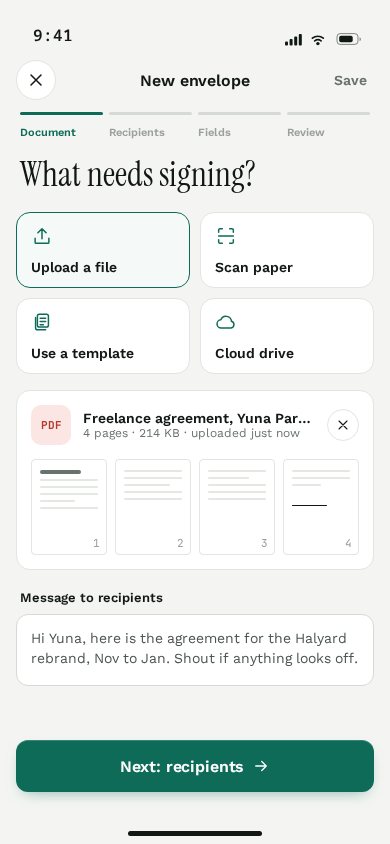
Inkline is a complete contract signing app: welcome, sign in, adopting a signature, a home with what needs your signature, an inbox of envelopes, an envelope with its signer chain, a document viewer with sign here flags, a signature pad, finish and signed, then sending your own: upload, recipients and signing order, placing fields on the page, review and sent, live status as a signer reads, the audit trail certificate, templates, search, contacts, turnaround insights, plans, notifications, profile and settings. Paper white and hairlines with deep viridian ink and amber flags.
| Detail | Value |
|---|---|
| Screen type | Form |
| App | Inkline: Sign and send contracts |
| Category | Productivity |
| Design language | Clinical, light |
| Type | Instrument Serif for headings, Work Sans for text |
| Colours | #f4f5f2 background, #ffffff surface, #111714 text, #69726d text-muted, #0d6b57 accent, #e3f0eb accent-soft, #f5b638 secondary, #e2e5e0 border, #b23a2e danger |
What this screen says
- New envelope
- Save
- Document
- Recipients
- Fields
- Review
- What needs signing?
- Upload a file
- Scan paper
- Use a template
- Cloud drive
- Freelance agreement, Yuna Park.pdf
- 4 pages · 214 KB · uploaded just now
- Message to recipients
- Hi Yuna, here is the agreement for the Halyard rebrand, Nov to Jan. Shout if anything looks off.
- Next: recipients
Around it in Inkline
More form and input screens
- Glossa New document: Translate text, voice and camera
- Layout Edit text: Design anything from templates
- Tick Quick add: To-do lists and reminders
- Beacon Notify me: Find your devices and people
- Staffroom Request time off: HR, payslips and time off
- Slot New event type: Booking links and meeting scheduling
- Sheet Add field: Spreadsheets and databases
- Tunnel Double hop: VPN and online privacy
- Ping Report issue: Internet speed test
- Glance Price alert: Visual search with the camera
- Replay New recording: Record and share screen videos
- Easel Workspace: Collaborative whiteboard
Every productivity app form screen
What makes a good form screen
- Ask only what you need. Every field is a reason to stop. Remove optional fields or move them to later.
- Labels above fields. Visible labels stay readable while people type; placeholder-only labels disappear.
- Use the right keyboard and input. Number pads for amounts, email keyboards for email, pickers for dates and autofill for addresses and codes.
- Validate as people go. Show problems next to the field when people leave it, in words that say how to fix them.
The full form screen guide and every example
Remix Inkline free: describe your own app and it is drawn in this design. Or get its files from $10: Figma, React Native, SwiftUI, Flutter and HTML.