Templates · Home screens · Lifestyle app · Inked
Inked Home screen
A home screen from Inked, a tattoo artists and bookings app template in a Dark-first style. Screen 4 of 25.
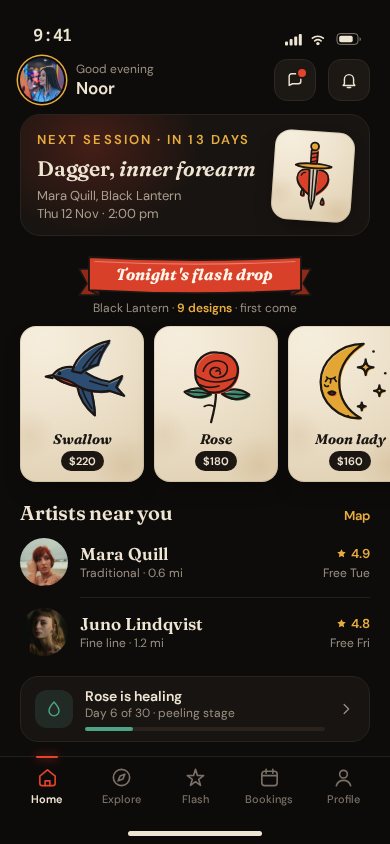
Inked is a complete tattoo app: welcome and style picks, sign in, a home with your next session and today's flash drop, explore and a studio map, artist pages with a portfolio, a healed piece, a flash sheet and a flash design, a stencil try on, a custom request, booking a slot, paying the deposit and the confirmation, appointments and session prep, messages with sketch approval, an aftercare tracker, your collection, notifications, Inked Plus, profile and settings. Warm ink black and bone with flash red, mustard and jade.
| Detail | Value |
|---|---|
| Screen type | Home |
| App | Inked: Tattoo artists and bookings |
| Category | Lifestyle |
| Design language | Dark-first, dark |
| Type | Fraunces for headings, DM Sans for text |
| Colours | #0e0c0b background, #181411 surface, #efe5d3 text, #9a8f80 text-muted, #e5432c accent, #fff6ea accent-contrast, #efe4cf secondary, #2a231d border, #e8ad3f warning, #4fa386 success |
What this screen says
- Good eveningNoor
- Next session · in 13 days
- Dagger, inner forearm
- Mara Quill, Black Lantern
- Thu 12 Nov · 2:00 pm
- Tonight's flash drop
- Black Lantern · 9 designs · first come
- Swallow
- Rose
- Moon lady
- Moth
- Artists near you
- Map
- Mara QuillTraditional · 0.6 mi
- 4.9Free Tue
- Juno LindqvistFine line · 1.2 mi
- 4.8Free Fri
- Rose is healingDay 6 of 30 · peeling stage
- Home
- Explore
- Flash
- Bookings
- Profile
Around it in Inked
More home screens
- Fern Home: Plant care
- Doorstep Home: Homes for sale and rent
- Rewear Home: Secondhand fashion marketplace
- Laced Home: Sneaker drops and raffles
- Gloss Home: Salon and spa booking
- Vow Home: Wedding planner
- Drizzle Home: Weather with living skies
- Byline Today: Daily news reader
- Shelf Home: Reading tracker and book club
- Marquee Home: Cinema tickets and watchlist
- Handy Home: Home services
- Tasker Home: Book and do local odd jobs
Every lifestyle app home screen
What makes a good home screen
- Put the most important thing first. Decide the one thing most people come for, like today's workout, a balance or the next booking, and give it the top of the screen.
- Make it feel current. Greetings with the time of day, today's date, fresh numbers and recent activity tell people the app is alive and about them.
- Keep quick actions within thumb reach. The two or three things people do most should be one tap away, in the lower part of the screen or a floating button.
- Group related content in clear sections. Use headings and spacing so the screen scans as a few blocks, not a long mixed list.
The full home screen guide and every example
Remix Inked free: describe your own app and it is drawn in this design. Or get its files from $10: Figma, React Native, SwiftUI, Flutter and HTML.