Templates · Success and confirmation screens · Travel app · Hollow
Hollow Booked screen
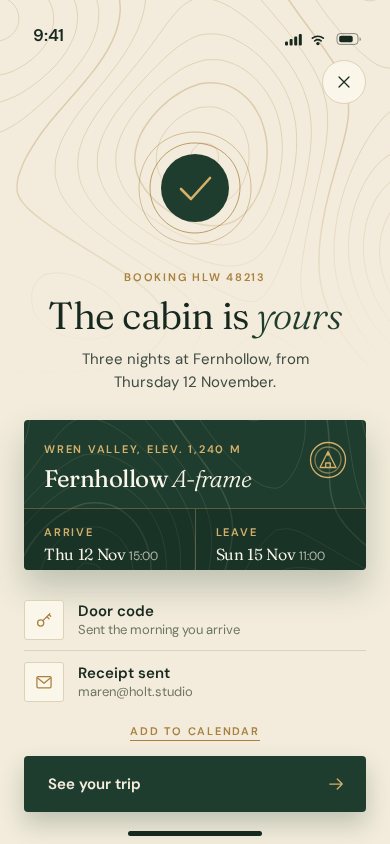
A success screen from Hollow, a cabin and boutique stays app template in a Luxury style. Screen 13 of 25.
Hollow is a complete stays app: welcome, sign in and a code, an explore home with tall cabin cards, search, results, a contour map with price pins, a stay page, reviews, dates, guests, checkout and a booked screen, trips and a trip with arrival details, a host guidebook and a trail with its elevation profile, inbox and host chat, wishlists, a nights away dashboard, a membership, notifications, profile and settings. Forest green, cream and one brass throughout.
| Detail | Value |
|---|---|
| Screen type | Success |
| App | Hollow: Cabin and boutique stays |
| Category | Travel |
| Design language | Luxury, light |
| Type | DM Sans |
| Colours | #f3ecdc background, #fbf6ea surface, #17281f text, #6d7566 text-muted, #1f3d2e accent, #f6efdf accent-contrast, #a8813f secondary, #ddd2b8 border, #a4442e danger |
What this screen says
- Booking HLW 48213
- The cabin is yours
- Three nights at Fernhollow, from Thursday 12 November.
- Wren Valley, elev. 1,240 m
- Fernhollow A-frame
- Arrive
- Thu 12 Nov 15:00
- Leave
- Sun 15 Nov 11:00
- Door codeSent the morning you arrive
- Receipt sentmaren@holt.studio
- Add to calendar
- See your trip
Around it in Hollow
More success and confirmation screens
- Lodge Confirmed: Hotels, deals and reservations
- Fare Booked: Flight search and price alerts
- Rove Booked: Reviews and things to do
- Ignition Booked: Car rental from local hosts
- Contrail Booked: Airline booking, check-in and boarding
- Keycard Booked: Hotel stays, digital key and room service
- Detour Reported: Community driving navigation
- Convoy Booked: Carpooling between cities
- Manifest Rebooked: Trip plans from your confirmation emails
- Roadster Booked: Your electric car, from your phone
- Fairground Return time: Theme park tickets, wait times and map
- Scoot Unlocked: E-scooter and e-bike rental
Every travel app success screen
What makes a good confirmation screen
- Confirm in the headline. "Payment sent", "Table booked for Friday at 8" or "Lesson complete" in plain words, with a clear success colour or icon.
- Repeat the key details. Amount, date, reference number or score, so people do not need to check elsewhere that the right thing happened.
- Say what happens next. When the order arrives, when the money lands, when the next lesson unlocks.
- Offer the next step. Track the order, add to calendar, share, or start the next lesson. One primary action and a way back home.
The full confirmation screen guide and every example
Remix Hollow free: describe your own app and it is drawn in this design. Or get its files from $10: Figma, React Native, SwiftUI, Flutter and HTML.