Templates · List and feed screens · Lifestyle app · Hem
Hem Garment history screen
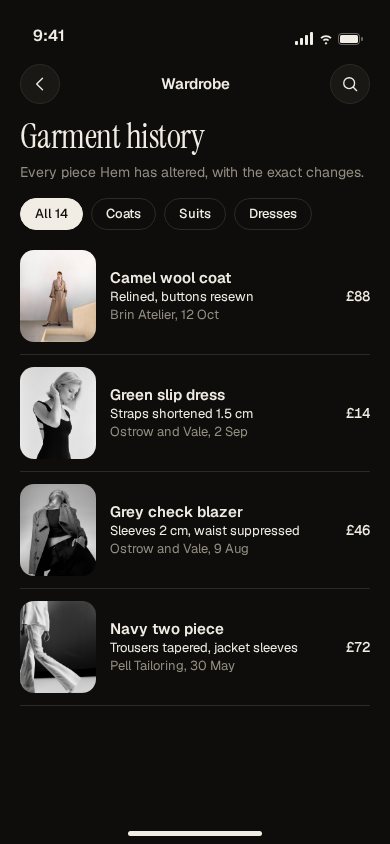
A list screen from Hem, a lifestyle app template in a Minimal style. Screen 21 of 25.
Hem is a complete tailoring and alterations app: welcome and how it works, sign in, a home with the order at the bench and nearby tailors, choosing a garment and the work, a drawn hem length diagram, guided self measuring on a body diagram, a fit photo camera, a price quote, a tailor page, a collection slot picker, review and booking, live courier tracking on a map, tailor progress with notes and photos, a fitting appointment, delivery back with a handover code, orders, saved measurements with a waist trend, garment history, a Plus plan, notifications, profile and settings. Warm black and charcoal with chalk gold and bone white.
| Detail | Value |
|---|---|
| Screen type | List |
| App | Hem: Tailoring and alterations, collected |
| Category | Lifestyle |
| Design language | Minimal, dark |
| Type | Instrument Serif for headings, Geist for text |
| Colours | #0e0d0b background, #191814 surface, #f2ede4 text, #948d81 text-muted, #e2bd6b accent, #17140e accent-contrast, #22201b secondary, #2c2a24 border, #d9665a danger |
What this screen says
- Wardrobe
- Garment history
- Every piece Hem has altered, with the exact changes.
- All 14 Coats Suits Dresses
- Camel wool coat
- Relined, buttons resewn Brin Atelier, 12 Oct
- Green slip dress
- Straps shortened 1.5 cm Ostrow and Vale, 2 Sep
- Grey check blazer
- Sleeves 2 cm, waist suppressed Ostrow and Vale, 9 Aug
- Navy two piece
- Trousers tapered, jacket sleeves Pell Tailoring, 30 May
Around it in Hem
More list and feed screens
- Splice Add media: Video editor for short clips
- Blush Lipstick: Beauty and makeup shopping
- Flatpack Room: Furniture store with room previews
- Column Comments: Newsletters and independent writers
- Fetch Sitters: Dog walkers and pet sitters
- Forecourt Results: Buy and sell used cars
- Tower Bills: Mobile plan, data and bills
- Haul Flash sale: Bargain fashion and finds
- Muse Styles: AI image studio
- Admit This weekend: Events and tickets near you
- Arcade Autumn sale: Game store, library and friends
- Natal Aspects: Birth charts and daily astrology
Every lifestyle app list screen
What makes a good list screen
- Show what people need to decide. Each row should carry just enough to choose: a title, one or two details and a status. Everything else belongs on the detail screen.
- Keep rows consistent. The same information in the same place on every row lets people scan down a column instead of reading each item.
- Group with headings. Dates, categories or status headings break long lists into chunks people can skip through.
- Make common actions quick. Swipe actions, a checkbox or a heart on the row save opening the item for small tasks.
The full list screen guide and every example
Remix Hem free: describe your own app and it is drawn in this design. Or get its files from $10: Figma, React Native, SwiftUI, Flutter and HTML.