Templates · Form and input screens · Fitness app · Harbor
Harbor New entry screen
A form screen from Harbor, a therapy and mood app template in a Minimal style. Screen 11 of 25.
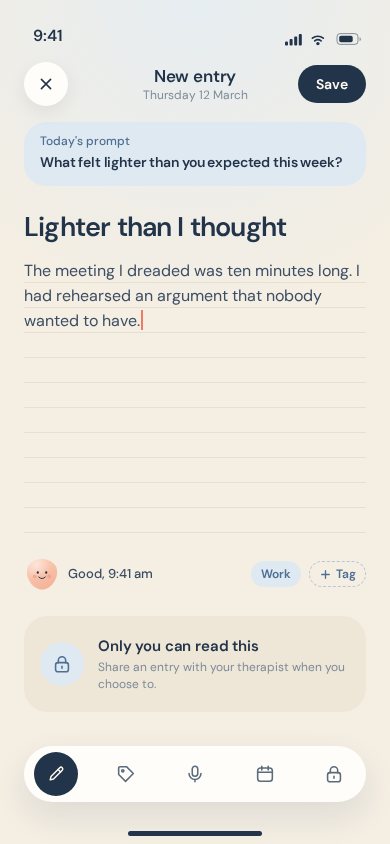
Harbor is a complete therapy and mood app: welcome, sign in, a passcode and first goals, a home that asks how you are, a two step mood check in, a journal with entries and prompts, mood trends with what lifts and weighs on you, therapist matching, a therapist page, booking and a video session, calming exercises with a breathing timer, crisis help, a Plus plan, notifications, profile and settings. Everything is drawn: five mood blobs with faces, soft portraits and a small boat in a harbour.
| Detail | Value |
|---|---|
| Screen type | Form |
| App | Harbor: Therapy and mood |
| Category | Health and fitness |
| Design language | Minimal, light |
| Type | DM Sans |
| Colours | #f4eee3 background, #fffdf9 surface, #22344a text, #7f8c99 text-muted, #55789c accent, #ffffff accent-contrast, #ee7b62 secondary, #e8dfd0 border, #cf4f3c danger |
What this screen says
- New entry
- Thursday 12 March
- Save
- Today's prompt
- What felt lighter than you expected this week?
- Lighter than I thought
- The meeting I dreaded was ten minutes long. I had rehearsed an argument that nobody wanted to have.
- Good, 9:41 am
- Work Tag
- Only you can read this
- Share an entry with your therapist when you choose to.
Around it in Harbor
More form and input screens
- Nightly Add tags: Smart ring sleep and readiness
- Pillbox Add medicine: Pharmacy refills and medicine reminders
- Rise Set alarm: Alarm clock and sleep cycles
- Ward Check in: Patient portal for results, visits and messages
- Level Target range: Glucose monitor companion
- Reformer Rate class: Pilates studio booking
- Sip Log a drink: Water intake and hydration
- Mend Log session: Physio and rehab exercises
- Tabata Build timer: HIIT interval timer
- Jab Combo builder: Boxing workouts with a smart bag
- Exhale Custom pattern: Breathwork sessions
- Bump Daily log: Pregnancy week by week
What makes a good form screen
- Ask only what you need. Every field is a reason to stop. Remove optional fields or move them to later.
- Labels above fields. Visible labels stay readable while people type; placeholder-only labels disappear.
- Use the right keyboard and input. Number pads for amounts, email keyboards for email, pickers for dates and autofill for addresses and codes.
- Validate as people go. Show problems next to the field when people leave it, in words that say how to fix them.
The full form screen guide and every example
Remix Harbor free: describe your own app and it is drawn in this design. Or get its files from $10: Figma, React Native, SwiftUI, Flutter and HTML.