Templates · Profile screens · Social app · Guild
Guild Profile screen
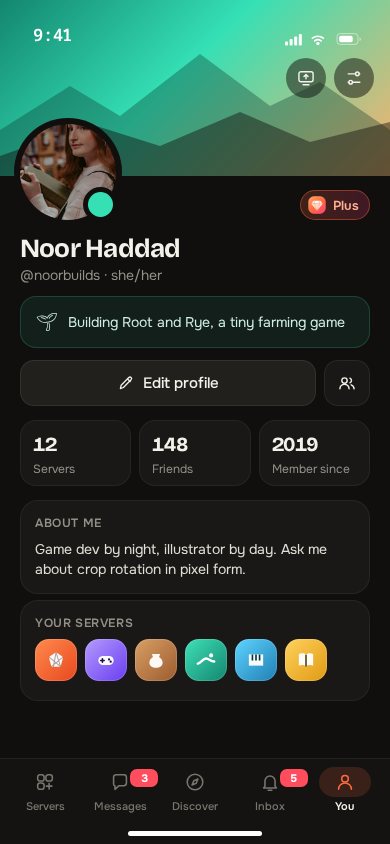
A profile screen from Guild, a social app template in a Dark-first style. Screen 24 of 25.
Guild is a complete community chat app: welcome, sign in, a code check and interests, a home with a server rail and channel list, a busy text channel with replies, reactions and a thread, a voice room with video and a shared screen, a live stage, direct messages, discover and a server preview, message search, members and a member card, create a server, an event, server insights, an inbox, a Plus plan with checkout and confirmation, profile and settings. Warm charcoal with ember orange and a teal for live voice.
| Detail | Value |
|---|---|
| Screen type | Profile |
| App | Guild: Community servers with voice and text chat |
| Category | Social |
| Design language | Dark-first, dark |
| Type | Bricolage Grotesque for headings, Onest for text |
| Colours | #100f0e background, #191816 surface, #f4f1ea text, #948f87 text-muted, #ff6a3d accent, #1b0700 accent-contrast, #35e0b5 secondary, #2c2a26 border, #ff4d5e danger |
What this screen says
- Plus
- Noor Haddad
- @noorbuilds · she/her
- 🌱Building Root and Rye, a tiny farming game
- Edit profile
- 12Servers
- 148Friends
- 2019Member since
- About me
- Game dev by night, illustrator by day. Ask me about crop rotation in pixel form.
- Your servers
- Servers
- Messages3
- Discover
- Inbox5
- You
Around it in Guild
More profile screens
- Flick Creator: Short video feed
- Squawk Profile: Short posts and live conversation
- Agora Profile: Communities, threads and votes
- Spark Me: Swipe dating
- Candid Friend profile: One real photo a day
- Blink Friend: Camera chat and stories
- Cipher Contact info: Encrypted private messenger
- Commons Profile: Friends, groups and events
- Tether Profile: Family location and safety
- Facet You: Video calls with family and friends
- Stoop Neighbour: Neighbourhood noticeboard
- Aura Profile: Moods with close friends
Every social app profile screen
What makes a good profile screen
- Lead with identity. Photo, name and one line about the person at the top. It confirms whose profile this is.
- Show meaningful stats. Two to four numbers that matter in this app, like workouts, followers, books read or streak.
- Make editing obvious for the owner. An Edit profile button near the top, shown only on your own profile.
- Organise content with tabs. Posts, activity, saved or achievements as tabs keep a long profile tidy.
The full profile screen guide and every example
Remix Guild free: describe your own app and it is drawn in this design. Or get its files from $10: Figma, React Native, SwiftUI, Flutter and HTML.