Templates · List and feed screens · Social app · Guild
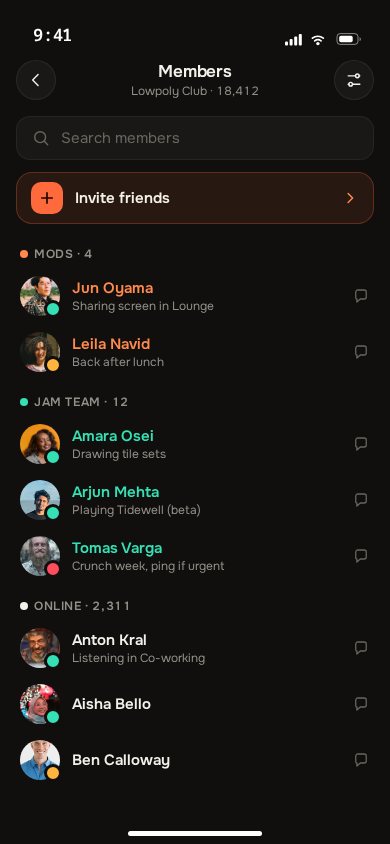
Guild Members screen
A list screen from Guild, a social app template in a Dark-first style. Screen 15 of 25.
Guild is a complete community chat app: welcome, sign in, a code check and interests, a home with a server rail and channel list, a busy text channel with replies, reactions and a thread, a voice room with video and a shared screen, a live stage, direct messages, discover and a server preview, message search, members and a member card, create a server, an event, server insights, an inbox, a Plus plan with checkout and confirmation, profile and settings. Warm charcoal with ember orange and a teal for live voice.
| Detail | Value |
|---|---|
| Screen type | List |
| App | Guild: Community servers with voice and text chat |
| Category | Social |
| Design language | Dark-first, dark |
| Type | Bricolage Grotesque for headings, Onest for text |
| Colours | #100f0e background, #191816 surface, #f4f1ea text, #948f87 text-muted, #ff6a3d accent, #1b0700 accent-contrast, #35e0b5 secondary, #2c2a26 border, #ff4d5e danger |
What this screen says
- MembersLowpoly Club · 18,412
- Search members
- Invite friends
- Mods · 4
- Jun Oyama
- Sharing screen in Lounge
- Leila Navid
- Back after lunch
- Jam team · 12
- Amara Osei
- Drawing tile sets
- Arjun Mehta
- Playing Tidewell (beta)
- Tomas Varga
- Crunch week, ping if urgent
- Online · 2,311
- Anton Kral
- Listening in Co-working
- Aisha Bello
- Ben Calloway
Around it in Guild
More list and feed screens
- Ripple Replies: Voice notes social
- Duo Calendar: An app for two
- Soapbox Takes: Weekly debates and polls
- Ballot Voters: Settle it on paper
- Murmur Chats: Chat rooms for art lovers
- Wink Likes: Video first dating
- Snoot Places: Social app for pets
- Huddle Notifications: Interest groups and meetups
- Glade Comments: Photo and clip social network
- Onair Notifications: Live streaming
- Drift Comments: Reels and voice rooms
- Glitz Live now: Party live streaming
What makes a good list screen
- Show what people need to decide. Each row should carry just enough to choose: a title, one or two details and a status. Everything else belongs on the detail screen.
- Keep rows consistent. The same information in the same place on every row lets people scan down a column instead of reading each item.
- Group with headings. Dates, categories or status headings break long lists into chunks people can skip through.
- Make common actions quick. Swipe actions, a checkbox or a heart on the row save opening the item for small tasks.
The full list screen guide and every example
Remix Guild free: describe your own app and it is drawn in this design. Or get its files from $10: Figma, React Native, SwiftUI, Flutter and HTML.