Templates · List and feed screens · Social app · Ballot
Ballot Voters screen
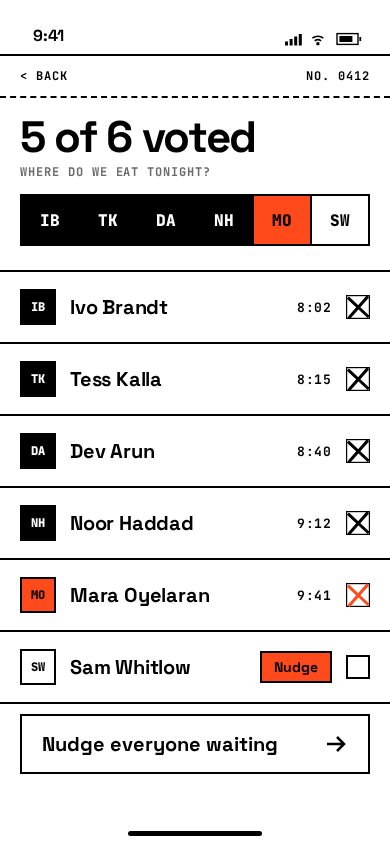
A list screen from Ballot, a settle it on paper app template in a Brutalist style. Screen 10 of 25.
Ballot is ballot settles where to eat and when to meet. It covers making a poll with options and a closing time, inviting voters, marking one box or ranking choices, live results with huge percentages, ranked count rounds, groups, an archive of closed polls, stats, notifications and a Ballot Plus plan.
| Detail | Value |
|---|---|
| Screen type | List |
| App | Ballot: Settle it on paper |
| Category | Social |
| Design language | Brutalist, light |
| Type | Space Grotesk |
| Colours | #ffffff background, #ffffff surface, #000000 text, #6b6b6b text-muted, #ff4a1c accent, #000000 accent-contrast, #000000 border |
What this screen says
- < BACK NO. 0412
- 5 of 6 voted
- WHERE DO WE EAT TONIGHT?
- IB TK DA NH MO SW
- IB Ivo Brandt8:02
- TK Tess Kalla8:15
- DA Dev Arun8:40
- NH Noor Haddad9:12
- MO Mara Oyelaran9:41
- SW Sam WhitlowNudge
- Nudge everyone waiting
Around it in Ballot
More list and feed screens
- Drift Comments: Reels and voice rooms
- Glitz Live now: Party live streaming
- Hearth Shared album: Messenger for trips and circles
- Chirp Chat actions: Messenger with file sharing
- Banter New chat: Live messenger
- Natter Start new: Minimal messenger
- Nearly Crossed paths: Dating by crossed paths
- Linkup Skills: Professional network and jobs
- Quorum Comments: Questions and expert answers
- Backer Community: Support creators with memberships
- Pledge Rewards: Back creative projects
- Civic My requests: Report issues and city services
What makes a good list screen
- Show what people need to decide. Each row should carry just enough to choose: a title, one or two details and a status. Everything else belongs on the detail screen.
- Keep rows consistent. The same information in the same place on every row lets people scan down a column instead of reading each item.
- Group with headings. Dates, categories or status headings break long lists into chunks people can skip through.
- Make common actions quick. Swipe actions, a checkbox or a heart on the row save opening the item for small tasks.
The full list screen guide and every example
Remix Ballot free: describe your own app and it is drawn in this design. Or get its files from $10: Figma, React Native, SwiftUI, Flutter and HTML.