Templates · List and feed screens · Lifestyle app · Guardrail
Guardrail Requests screen
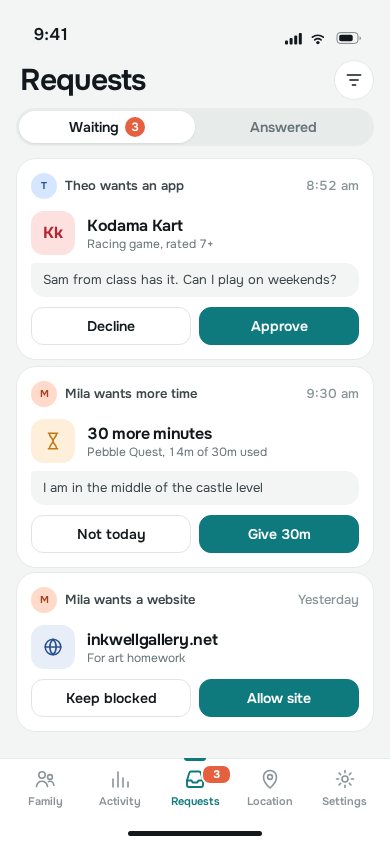
A list screen from Guardrail, a parental controls and screen time app template in a Minimal style. Screen 13 of 25.
Guardrail is a complete family screen time app for parents: welcome, adding a child, sign in and linking a device, a family home with each child's day rail, a child overview, weekly activity, per app usage, daily and app limits, a bedtime dial, school time, app approval requests with an approved screen, bonus time, content filters by age, live location, devices with lock and ring, notifications, a Plus plan, profile and settings. Pale mist and white with petrol teal, dusk indigo and a warm amber for bonus time.
| Detail | Value |
|---|---|
| Screen type | List |
| App | Guardrail: Parental controls and screen time |
| Category | Lifestyle |
| Design language | Minimal, light |
| Type | Onest |
| Colours | #f3f5f4 background, #ffffff surface, #12181b text, #687476 text-muted, #0e7a7e accent, #ffffff accent-contrast, #3d3f8f secondary, #e6eae9 border, #e5603f danger |
What this screen says
- Requests
- Waiting3 Answered
- T Theo wants an app8:52 am
- Kk
- Kodama Kart
- Racing game, rated 7+
- Sam from class has it. Can I play on weekends?
- Decline Approve
- M Mila wants more time9:30 am
- 30 more minutes
- Pebble Quest, 14m of 30m used
- I am in the middle of the castle level
- Not today Give 30m
- M Mila wants a websiteYesterday
- inkwellgallery.net
- For art homework
- Keep blocked Allow site
- Family
- Activity
- Requests 3
- Location
- Settings
Around it in Guardrail
More list and feed screens
- Circuit Deals: Electronics store with trade-in and repairs
- Provenance Results: Authenticated luxury resale
- Gavel Auctions: Live online auctions
- Tidy Choose cleaner: Book home cleaners
- Dorm Saved: Find student housing
- Hem Orders: Tailoring and alterations, collected
- Lendly Party gear: Borrow things from neighbours
- Stub Listings: Fan to fan ticket resale
- Trove Boards: Visual ideas and boards
- Vidi Comments: Video platform for creators
- Roll Albums: Photo library and backups
- Splice Add media: Video editor for short clips
Every lifestyle app list screen
What makes a good list screen
- Show what people need to decide. Each row should carry just enough to choose: a title, one or two details and a status. Everything else belongs on the detail screen.
- Keep rows consistent. The same information in the same place on every row lets people scan down a column instead of reading each item.
- Group with headings. Dates, categories or status headings break long lists into chunks people can skip through.
- Make common actions quick. Swipe actions, a checkbox or a heart on the row save opening the item for small tasks.
The full list screen guide and every example
Remix Guardrail free: describe your own app and it is drawn in this design. Or get its files from $10: Figma, React Native, SwiftUI, Flutter and HTML.