Templates · List and feed screens · Music app · Groove
Groove Notifications screen
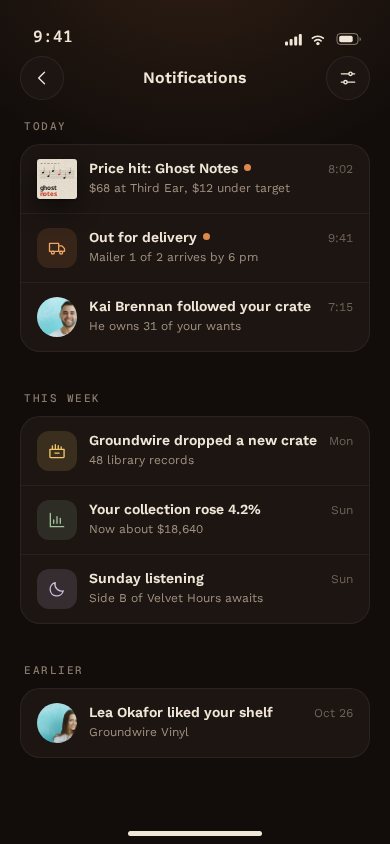
A list screen from Groove, a vinyl collection and crate digging app template in a Luxury style. Screen 22 of 25.
Groove is a complete vinyl app: welcome, tastes and sign in, a home with the record now spinning and the collection's value, a cover grid of the collection, a record page with grades, matrix and value, every pressing of a release, a turntable now spinning screen, scanning a sleeve and adding it with media and sleeve grades, dig and search across independent shops, an artist, a shop listing, a record shop, basket, checkout, order placed and a live shipment, listening stats, a wantlist with price targets, notifications, a Reserve plan, profile and settings. Walnut black and ivory with a cognac accent and twelve original album covers.
| Detail | Value |
|---|---|
| Screen type | List |
| App | Groove: Vinyl collection and crate digging |
| Category | Music |
| Design language | Luxury, dark |
| Type | Instrument Serif for headings, Work Sans for text |
| Colours | #120d0b background, #1c1512 surface, #f1e7d8 text, #a39282 text-muted, #e0874a accent, #1f120a accent-contrast, #9fc29a secondary, #2a201b border, #e5604d danger |
What this screen says
- Notifications
- Today
- Price hit: Ghost Notes$68 at Third Ear, $12 under target
- Out for deliveryMailer 1 of 2 arrives by 6 pm
- Kai Brennan followed your crateHe owns 31 of your wants
- This week
- Groundwire dropped a new crate48 library records
- Mon
- Your collection rose 4.2%Now about $18,640
- Sun
- Sunday listeningSide B of Velvet Hours awaits
- Earlier
- Lea Okafor liked your shelfGroundwire Vinyl
- Oct 26
Around it in Groove
More list and feed screens
- Aria Store: Audiobook library
- Hum Library: Song recognition
- Riff Stream: Upload and discover new tracks
- Crossfade Library: DJ mixing on the go
- Fork Presets: Tuner and metronome
- Belt Clips: Karaoke nights
- Crowd Diary: Concert diary and setlists
- Dial City: Internet radio from everywhere
- Chorus Course: Singing lessons and pitch training
- Verse Songs: Songwriting notebook
- Masters Catalog: Royalties and streams for artists
- Sonata Season: Concert hall season and tickets
What makes a good list screen
- Show what people need to decide. Each row should carry just enough to choose: a title, one or two details and a status. Everything else belongs on the detail screen.
- Keep rows consistent. The same information in the same place on every row lets people scan down a column instead of reading each item.
- Group with headings. Dates, categories or status headings break long lists into chunks people can skip through.
- Make common actions quick. Swipe actions, a checkbox or a heart on the row save opening the item for small tasks.
The full list screen guide and every example
Remix Groove free: describe your own app and it is drawn in this design. Or get its files from $10: Figma, React Native, SwiftUI, Flutter and HTML.