Templates · List and feed screens · Social app · Glade
Glade Activity screen
A list screen from Glade, a photo and clip social network app template in a Glass style. Screen 18 of 25.
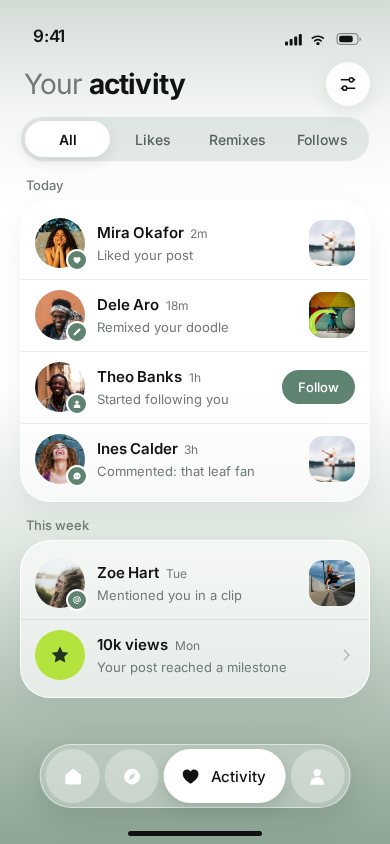
Glade is a complete photo and clip social app: a welcome photo grid, sign in, interests, a home with a story row and a photo feed, stories, posts and comments, a full-screen clip viewer with a frosted action rail, sounds, explore and search, creating a post with drawn-on doodles, activity, messages and chat, profiles, insights, saved collections, a Plus plan and settings. White into sage green with frosted glass, forest green buttons and lime doodle splashes.
| Detail | Value |
|---|---|
| Screen type | List |
| App | Glade: Photo and clip social network |
| Category | Social |
| Design language | Glass, light |
| Type | Inter |
| Colours | #ffffff background, #eef3ee surface, #101311 text, #6f7a73 text-muted, #5e8370 accent, #ffffff accent-contrast, #b4e33d secondary, #dfe7e1 border, #d9584a danger |
What this screen says
- Your activity
- All Likes Remixes Follows
- Today
- Mira Okafor2m
- Liked your post
- Dele Aro18m
- Remixed your doodle
- Theo Banks1h
- Started following you
- Follow
- Ines Calder3h
- Commented: that leaf fan
- This week
- Zoe HartTue
- Mentioned you in a clip
- 10k viewsMon
- Your post reached a milestone
- Activity
Around it in Glade
More list and feed screens
- Soapbox Takes: Weekly debates and polls
- Ballot Voters: Settle it on paper
- Murmur Chats: Chat rooms for art lovers
- Wink Likes: Video first dating
- Snoot Places: Social app for pets
- Huddle Notifications: Interest groups and meetups
- Onair Notifications: Live streaming
- Drift Comments: Reels and voice rooms
- Glitz Live now: Party live streaming
- Hearth Shared album: Messenger for trips and circles
- Chirp Chat actions: Messenger with file sharing
- Banter New chat: Live messenger
What makes a good list screen
- Show what people need to decide. Each row should carry just enough to choose: a title, one or two details and a status. Everything else belongs on the detail screen.
- Keep rows consistent. The same information in the same place on every row lets people scan down a column instead of reading each item.
- Group with headings. Dates, categories or status headings break long lists into chunks people can skip through.
- Make common actions quick. Swipe actions, a checkbox or a heart on the row save opening the item for small tasks.
The full list screen guide and every example
Remix Glade free: describe your own app and it is drawn in this design. Or get its files from $10: Figma, React Native, SwiftUI, Flutter and HTML.