Templates · Form and input screens · Finance app · Giftly
Giftly Amount screen
A form screen from Giftly, a finance app template in a Luxury style. Screen 7 of 25.
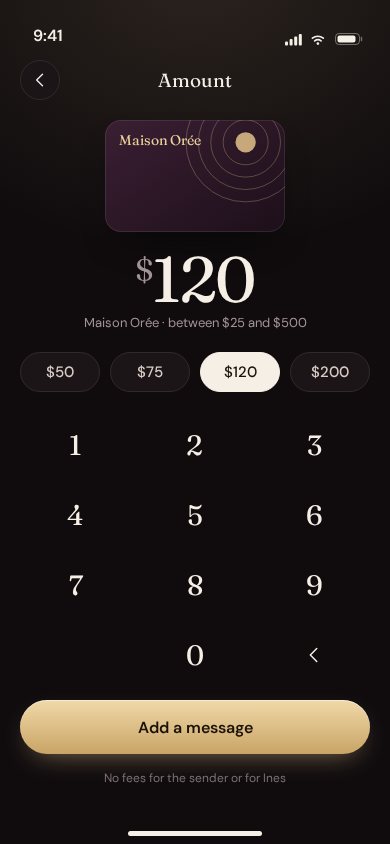
Giftly is a complete gift card app: welcome and sign in, a home with the wallet balance, quick actions, occasions and upcoming birthdays, browse by occasion and shop, a shop page, card design, amount, a video or written note, scheduled delivery by text or email, checkout and a sent confirmation, the recipient's unwrap reveal, a wallet of stored cards with balances, a card with its history, a barcode to redeem at the till, scanning a plastic card in and its added state, a group gift and chip in, spending insights, sent gifts, reminders for low balances and expiry, a Reserve plan, profile and settings. Plum black with champagne gold and a soft rose.
| Detail | Value |
|---|---|
| Screen type | Form |
| App | Giftly: Gift cards, sent and stored |
| Category | Finance |
| Design language | Luxury, dark |
| Type | Fraunces for headings, DM Sans for text |
| Colours | #100c0e background, #1b1518 surface, #f6efe6 text, #a39398 text-muted, #e2c28a accent, #1a1206 accent-contrast, #e7a59a secondary, #2c2327 border, #ff7a6e danger |
What this screen says
- Amount
- Maison Orée
- Maison Orée · between $25 and $500
- Add a message
- No fees for the sender or for Ines
Around it in Giftly
More form and input screens
- Till Charge: Card reader and sales for small shops
- Strike Strategy builder: Options trading
- Prism Link bank: Net worth across every account
- Folio Verify identity: Stocks and ETF investing
- Compound KYC: Mutual funds and SIPs
- Halden Send money: Premium neobank
- Lease Report a repair: Your tenancy, drawn to plan
- Claim Categorise: Expenses, filed like a till receipt
- Tally Edit budget: Monthly budgeting
- Divvy New group: Split bills with friends
- Ticker Order ticket: Stock investing
- Burrow New pot: Shared savings pots
What makes a good form screen
- Ask only what you need. Every field is a reason to stop. Remove optional fields or move them to later.
- Labels above fields. Visible labels stay readable while people type; placeholder-only labels disappear.
- Use the right keyboard and input. Number pads for amounts, email keyboards for email, pickers for dates and autofill for addresses and codes.
- Validate as people go. Show problems next to the field when people leave it, in words that say how to fix them.
The full form screen guide and every example
Remix Giftly free: describe your own app and it is drawn in this design. Or get its files from $10: Figma, React Native, SwiftUI, Flutter and HTML.