Templates · Detail screens · Productivity app · Frontdesk
Frontdesk Chat screen
A detail screen from Frontdesk, a customer support inbox app template in an Enterprise style. Screen 14 of 25.
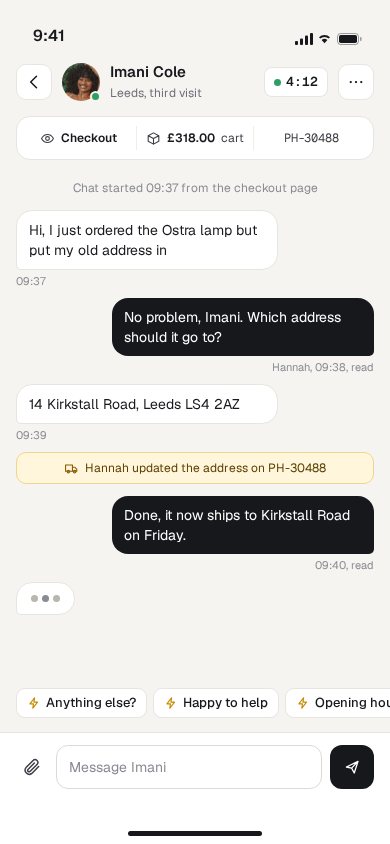
Frontdesk is a complete support agent app: welcome, sign in, a home with your queue and tickets at risk, saved views, an inbox sorted by SLA, a ticket thread with internal notes, the customer card, a reply with macros, mentions, assign and tag, a solved screen, live chats with a running conversation, a voice call with a live transcript, search, the customer's order with a partial refund, team performance, satisfaction ratings, the team, notifications, a Pro plan, profile and settings. Warm paper and white with ink and marigold.
| Detail | Value |
|---|---|
| Screen type | Detail |
| App | Frontdesk: Customer support inbox |
| Category | Productivity |
| Design language | Enterprise, light |
| Type | Geist |
| Colours | #f5f4f0 background, #ffffff surface, #17181c text, #6e6f78 text-muted, #f4b324 accent, #17181c accent-contrast, #17181c secondary, #e7e5df border, #d93a3a danger |
What this screen says
- Imani ColeLeeds, third visit
- Checkout
- £318.00 cart
- PH-30488
- Chat started 09:37 from the checkout page
- Hi, I just ordered the Ostra lamp but put my old address in
- No problem, Imani. Which address should it go to?
- Hannah, 09:38, read
- 14 Kirkstall Road, Leeds LS4 2AZ
- Hannah updated the address on PH-30488
- Done, it now ships to Kirkstall Road on Friday.
- 09:40, read
- Anything else? Happy to help Opening hours
- Message Imani
Around it in Frontdesk
More detail screens
- Ping Test details: Internet speed test
- Glance Product: Visual search with the camera
- Replay Video: Record and share screen videos
- Easel Retro template: Collaborative whiteboard
- Token Account: Two-factor codes and sign-in approvals
- Beam Transfer: Send big files
- Parchment Document: Documents, edit and share
- Lectern Deck: Slides and presenter remote
- Ringer Call details: Phone, contacts and voicemail
- Pipeline Deal: Sales CRM on the road
- Aim Objective: Goals and key results
- Scribe Note: Voice memos to notes
Every productivity app detail screen
What makes a good detail screen
- Lead with what identifies the item. A large image or title, the price or status, and the key facts at the top. People should know they are in the right place at a glance.
- Keep the main action visible. A sticky bottom button for Add to cart, Book or Play stays reachable while people scroll through details.
- Order information by importance. The facts that decide the choice come first; reviews, specifications and fine print further down.
- Use progressive disclosure. Long descriptions, specifications and policies can expand on tap rather than filling the screen.
The full detail screen guide and every example
Remix Frontdesk free: describe your own app and it is drawn in this design. Or get its files from $10: Figma, React Native, SwiftUI, Flutter and HTML.