Templates · Dashboard and stats screens · Fitness app · Forge
Forge Progress screen
A dashboard screen from Forge, an AI fitness and nutrition app template in a Dark-first style. Screen 22 of 25.
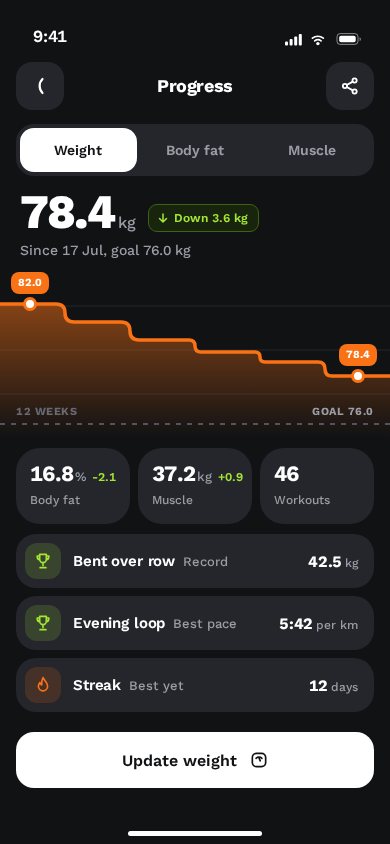
Forge is a complete AI fitness and nutrition app: onboarding, sign in, goal setup, a home with fitness metrics and today's workout, a fitness score, the workout library, workout and exercise details, a live workout, a tracked run on a map, heart rate, a nutrition day with macros, meal logging, a food scan, calories, sleep, an AI coach chat with voice, progress and body stats, a Pro plan, profile and settings. Near black and charcoal with hot orange, cobalt blue and black and white photography.
| Detail | Value |
|---|---|
| Screen type | Dashboard |
| App | Forge: AI fitness and nutrition |
| Category | Health and fitness |
| Design language | Dark-first, dark |
| Type | Work Sans |
| Colours | #111214 background, #24262b surface, #ffffff text, #9a9da6 text-muted, #f97316 accent, #ffffff accent-contrast, #2563eb secondary, #393c43 border, #f43f5e danger |
What this screen says
- Progress
- Weight Body fat Muscle
- 78.4kg Down 3.6 kg
- Since 17 Jul, goal 76.0 kg
- 12 WEEKS GOAL 76.0
- Body fat
- 37.2kg+0.9
- Muscle
- Workouts
- Bent over rowRecord
- 42.5kg
- Evening loopBest pace
- 5:42per km
- StreakBest yet
- 12days
- Update weight
Around it in Forge
More dashboard and stats screens
- Lull Sleep: Sleep sounds and meditation
- Pace Activity: Fitness tracker
- Flexpass Activity: One membership, many studios
- Clinic Care overview: Find and book doctors
- Careline This month: Care for an ageing parent
- Velo Summary: Live and on-demand indoor cycling
- Vantage Energy reserve: Sports watch companion
- Labwork Report: Book blood tests and see results
- Segment Progress: Runs and rides with friends
- Nightly Sleep: Smart ring sleep and readiness
- Pillbox Week: Pharmacy refills and medicine reminders
- Rise Trends: Alarm clock and sleep cycles
Every fitness app dashboard screen
What makes a good dashboard screen
- One headline number. The figure that matters most, like balance, steps or revenue, large at the top with its change since the last period.
- Give numbers context. Compared with last week, against a goal or as a trend line. A number alone does not say if it is good.
- Pick simple charts. Bars for comparing periods, lines for trends and rings for progress toward a goal. Avoid charts that need a legend to read.
- Let people change the period. Day, week, month and year as a segmented control above the chart.
The full dashboard screen guide and every example
Remix Forge free: describe your own app and it is drawn in this design. Or get its files from $10: Figma, React Native, SwiftUI, Flutter and HTML.