Templates · Onboarding screens · Fitness app · Forge
Forge Your goal screen
An onboarding screen from Forge, an AI fitness and nutrition app template in a Dark-first style. Screen 3 of 25.
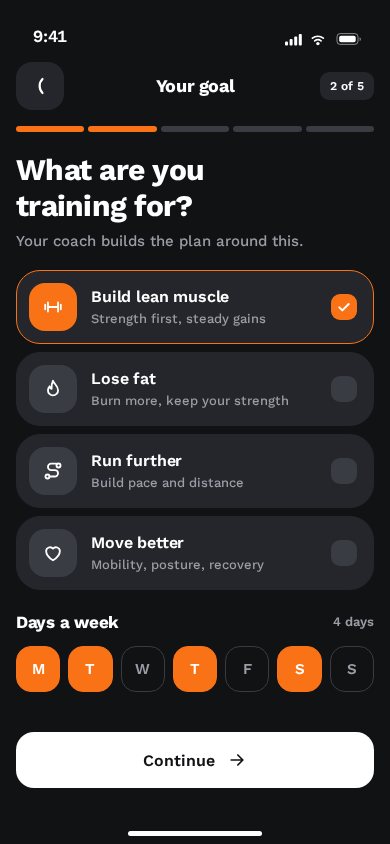
Forge is a complete AI fitness and nutrition app: onboarding, sign in, goal setup, a home with fitness metrics and today's workout, a fitness score, the workout library, workout and exercise details, a live workout, a tracked run on a map, heart rate, a nutrition day with macros, meal logging, a food scan, calories, sleep, an AI coach chat with voice, progress and body stats, a Pro plan, profile and settings. Near black and charcoal with hot orange, cobalt blue and black and white photography.
| Detail | Value |
|---|---|
| Screen type | Onboarding |
| App | Forge: AI fitness and nutrition |
| Category | Health and fitness |
| Design language | Dark-first, dark |
| Type | Work Sans |
| Colours | #111214 background, #24262b surface, #ffffff text, #9a9da6 text-muted, #f97316 accent, #ffffff accent-contrast, #2563eb secondary, #393c43 border, #f43f5e danger |
What this screen says
- Your goal
- 2 of 5
- What are you training for?
- Your coach builds the plan around this.
- Build lean muscle
- Strength first, steady gains
- Lose fat
- Burn more, keep your strength
- Run further
- Build pace and distance
- Move better
- Mobility, posture, recovery
- Days a week4 days
- M T W T F S S
- Continue
Around it in Forge
More onboarding screens
- Cradle Welcome: Baby tracker
- Medly Welcome: Doctor on call
- Donor Welcome: Blood donation, counted drop by drop
- Unfold Welcome: Yoga and stretching
- Kilo Welcome: Strength training log
- Cyra Welcome: Cycle tracker
- Harbor Welcome: Therapy and mood
- Fasten Welcome: Intermittent fasting
- Plate Welcome: Calorie and macro tracker
- Vita Welcome: Personal health record
- Lull Welcome: Sleep sounds and meditation
- Pace Welcome: Fitness tracker
Every fitness app onboarding screen
What makes a good onboarding screen
- One idea per screen. Each screen should say one thing in a headline people can read in a second. If a screen needs a paragraph, it is doing too much.
- Personalise with a purpose. Ask a question only if the answer changes what people see next, like a goal, a level or an interest. Then show that the answer mattered.
- Explain permissions before asking. Show your own screen saying why you need notifications, location or the camera before the system prompt. People who understand the reason are more likely to allow it.
- Let people skip. A visible skip or "I'll do this later" respects returning users and the impatient. Make sure skipping still lands them somewhere useful.
The full onboarding screen guide and every example
Remix Forge free: describe your own app and it is drawn in this design. Or get its files from $10: Figma, React Native, SwiftUI, Flutter and HTML.