Templates · Detail screens · Fitness app · Flexpass
Flexpass Class screen
A detail screen from Flexpass, a health and fitness app template in a Glass style. Screen 9 of 25.
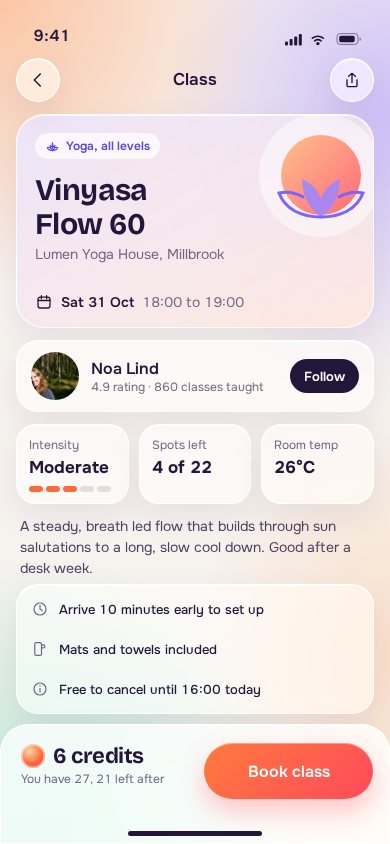
Flexpass is a complete multi studio membership: welcome, sign in and picking your mix, a home with the credit ring and your next class, search by time and type with filters, a studio map, studio and class pages, booking with a spot picker and confirmation, your schedule, a live check in pass, rating a class, wellness and spa bookings, on demand video, activity stats, a credit ledger, plans, saved studios, an instructor page, notifications, profile and settings. Cream glass with aubergine ink, a tangerine to coral gradient and a coin motif.
| Detail | Value |
|---|---|
| Screen type | Detail |
| App | Flexpass: One membership, many studios |
| Category | Health and fitness |
| Design language | Glass, light |
| Type | Bricolage Grotesque for headings, Onest for text |
| Colours | #f6f2ee background, #ffffff surface, #22163a text, #6f6782 text-muted, #ff5a36 accent, #ffffff accent-contrast, #7b63ff secondary, #ece6ee border, #e8344f danger |
What this screen says
- Class
- Yoga, all levels
- Vinyasa
- Flow 60
- Lumen Yoga House, Millbrook
- Sat 31 Oct 18:00 to 19:00
- Noa Lind
- 4.9 rating · 860 classes taught
- Follow
- Intensity
- Moderate
- Spots left
- 4 of 22
- Room temp
- 26°C
- A steady, breath led flow that builds through sun salutations to a long, slow cool down. Good after a desk week.
- Arrive 10 minutes early to set up
- Mats and towels included
- Free to cancel until 16:00 today
- 6 credits
- You have 27, 21 left after
- Book class
Around it in Flexpass
More detail screens
- Reformer Class: Pilates studio booking
- Sip Drink: Water intake and hydration
- Mend Session: Physio and rehab exercises
- Tabata Workout: HIIT interval timer
- Jab Workout: Boxing workouts with a smart bag
- Exhale Box breathing: Breathwork sessions
- Bump This week: Pregnancy week by week
- Locker Check in: Gym membership and class booking
- Morsel Result: AI calorie tracker
- Dew Concern: AI skin scan and routine
- Cradle Sleep: Baby tracker
- Medly Suggested care: Doctor on call
Every fitness app detail screen
What makes a good detail screen
- Lead with what identifies the item. A large image or title, the price or status, and the key facts at the top. People should know they are in the right place at a glance.
- Keep the main action visible. A sticky bottom button for Add to cart, Book or Play stays reachable while people scroll through details.
- Order information by importance. The facts that decide the choice come first; reviews, specifications and fine print further down.
- Use progressive disclosure. Long descriptions, specifications and policies can expand on tap rather than filling the screen.
The full detail screen guide and every example
Remix Flexpass free: describe your own app and it is drawn in this design. Or get its files from $10: Figma, React Native, SwiftUI, Flutter and HTML.