Templates · Form and input screens · Travel app · Fjord
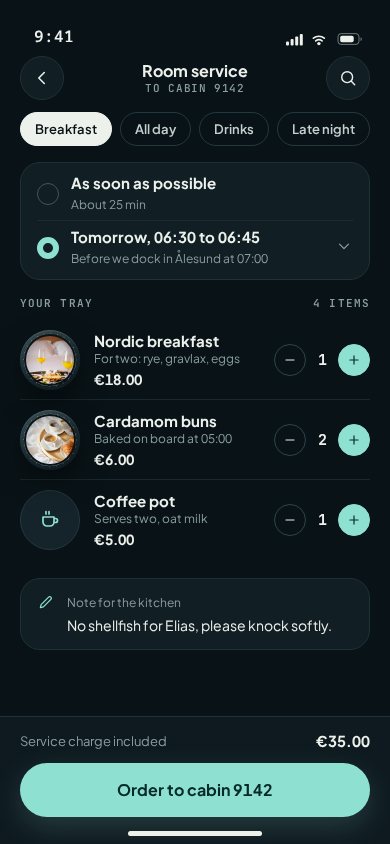
Fjord Room service screen
A form screen from Fjord, a cruise companion on board app template in a Dark-first style. Screen 19 of 25.
Fjord is a complete cruise companion: welcome, sign in with a booking reference, the safety drill, a today screen with the port, all aboard time and the day's plan, the itinerary on a nautical chart, port days, shore excursions with booking and a confirmation, a day planner, dining with a table reservation, a deck plan, the live voyage tracker, a bow camera, the onboard account, room service, Wi-Fi plans, the cabin, the cruise card, notifications, profile and settings. Fjord night slate with glacier mint and midnight sun amber.
| Detail | Value |
|---|---|
| Screen type | Form |
| App | Fjord: Cruise companion on board |
| Category | Travel |
| Design language | Dark-first, dark |
| Type | Fraunces for headings, Plus Jakarta Sans for text |
| Colours | #091317 background, #111e23 surface, #edf1ec text, #8b9ea3 text-muted, #8ee0d1 accent, #062a26 accent-contrast, #f5b862 secondary, #1f3138 border, #ff7a6b danger |
What this screen says
- Room serviceTo cabin 9142
- Breakfast All day Drinks Late night
- As soon as possibleAbout 25 min
- Tomorrow, 06:30 to 06:45Before we dock in Ålesund at 07:00
- Your tray
- 4 items
- Nordic breakfastFor two: rye, gravlax, eggs€18.00
- Cardamom bunsBaked on board at 05:00€6.00
- Coffee potServes two, oat milk€5.00
- Note for the kitchen
- No shellfish for Elias, please knock softly.
- Service charge included €35.00
- Order to cabin 9142
Around it in Fjord
More form and input screens
- Lodge Dates: Hotels, deals and reservations
- Fare Dates: Flight search and price alerts
- Rove Write a review: Reviews and things to do
- Ignition Driver check: Car rental from local hosts
- Contrail Dates: Airline booking, check-in and boarding
- Keycard Check in: Hotel stays, digital key and room service
- Detour Report: Community driving navigation
- Convoy Offer a ride: Carpooling between cities
- Manifest Add plan: Trip plans from your confirmation emails
- Roadster Charge schedule: Your electric car, from your phone
- Fairground Virtual queue: Theme park tickets, wait times and map
- Scoot Wallet: E-scooter and e-bike rental
What makes a good form screen
- Ask only what you need. Every field is a reason to stop. Remove optional fields or move them to later.
- Labels above fields. Visible labels stay readable while people type; placeholder-only labels disappear.
- Use the right keyboard and input. Number pads for amounts, email keyboards for email, pickers for dates and autofill for addresses and codes.
- Validate as people go. Show problems next to the field when people leave it, in words that say how to fix them.
The full form screen guide and every example
Remix Fjord free: describe your own app and it is drawn in this design. Or get its files from $10: Figma, React Native, SwiftUI, Flutter and HTML.