Templates · List and feed screens · Fitness app · Fasten
Fasten History screen
A list screen from Fasten, an intermittent fasting app template in a Dark-first style. Screen 19 of 25.
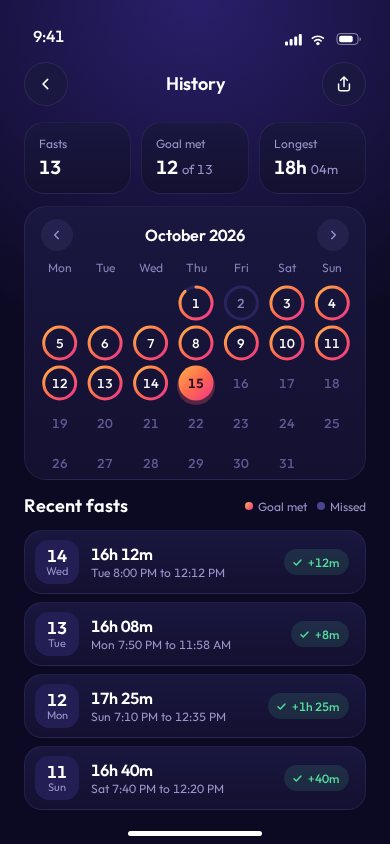
Fasten is a complete intermittent fasting app: welcome, sign in, a code, a goal and an eating window, a home built around a glowing timer ring, the stages of the fast on a timeline, ending a fast and its summary, fasting plans, a meal log, water, a weight trend, history on a calendar, insights, notifications, a Plus plan, profile and settings. One orange to magenta gradient marks the fast itself: the ring, the stage you are in and every main button.
| Detail | Value |
|---|---|
| Screen type | List |
| App | Fasten: Intermittent fasting |
| Category | Health and fitness |
| Design language | Dark-first, dark |
| Type | Outfit |
| Colours | #0c0a22 background, #17143a surface, #ffffff text, #9a95c9 text-muted, #ff8a4c accent, #25082b accent-contrast, #f0338f secondary, #2a2658 border, #ff5d73 danger |
What this screen says
- History
- Fasts 13
- Goal met 12 of 13
- Longest 18h 04m
- October 2026
- Recent fasts
- Goal metMissed
- 14Wed
- 16h 12m
- Tue 8:00 PM to 12:12 PM
- +12m
- 13Tue
- 16h 08m
- Mon 7:50 PM to 11:58 AM
- +8m
- 12Mon
- 17h 25m
- Sun 7:10 PM to 12:35 PM
- +1h 25m
- 11Sun
- 16h 40m
- Sat 7:40 PM to 12:20 PM
- +40m
Around it in Fasten
More list and feed screens
- Velo Schedule: Live and on-demand indoor cycling
- Vantage Activities: Sports watch companion
- Labwork Results: Book blood tests and see results
- Segment Comments: Runs and rides with friends
- Nightly Journal: Smart ring sleep and readiness
- Pillbox Medicines: Pharmacy refills and medicine reminders
- Rise Alarms: Alarm clock and sleep cycles
- Ward Visits: Patient portal for results, visits and messages
- Level Logbook: Glucose monitor companion
- Reformer Schedule: Pilates studio booking
- Sip History: Water intake and hydration
- Mend Plan: Physio and rehab exercises
What makes a good list screen
- Show what people need to decide. Each row should carry just enough to choose: a title, one or two details and a status. Everything else belongs on the detail screen.
- Keep rows consistent. The same information in the same place on every row lets people scan down a column instead of reading each item.
- Group with headings. Dates, categories or status headings break long lists into chunks people can skip through.
- Make common actions quick. Swipe actions, a checkbox or a heart on the row save opening the item for small tasks.
The full list screen guide and every example
Remix Fasten free: describe your own app and it is drawn in this design. Or get its files from $10: Figma, React Native, SwiftUI, Flutter and HTML.