Templates · List and feed screens · Fitness app · Exhale
Exhale Programs screen
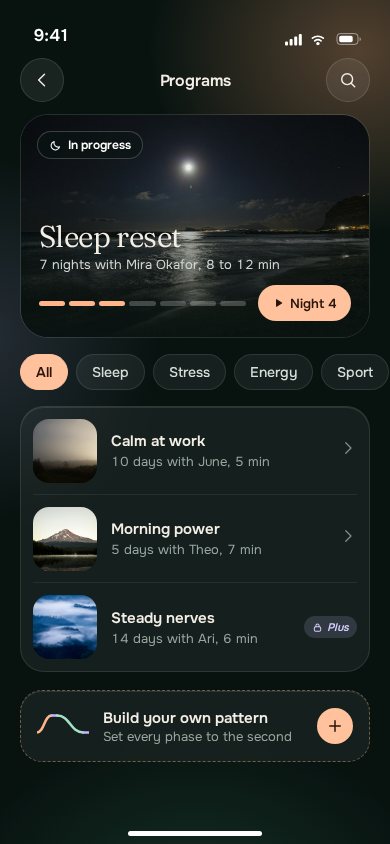
A list screen from Exhale, a breathwork sessions app template in a Glass style. Screen 15 of 25.
Exhale is a complete breathwork app: welcome, goals, sign in, a Today home with tonight's breath, explore techniques, a box breathing page, a custom pattern builder, a pre-session check-in, a live guided session around a glowing orb, breath hold rounds, a session summary, history, insights with HRV and calm minutes, a camera HRV check, programs and a sleep program, a guide, an audio lesson, soundscapes, reminders, notifications, a Plus plan and trial checkout, profile and settings. Pine black glass with apricot dawn light, lilac and sage.
| Detail | Value |
|---|---|
| Screen type | List |
| App | Exhale: Breathwork sessions |
| Category | Health and fitness |
| Design language | Glass, dark |
| Type | Fraunces for headings, Onest for text |
| Colours | #081310 background, #14211d surface, #f4efe6 text, #97a69f text-muted, #ffb48a accent, #2b150a accent-contrast, #c3b8ff secondary, #a6e3c6 success, #26332e border, #ff8a7a danger |
What this screen says
- Programs
- In progress
- Sleep reset
- 7 nights with Mira Okafor, 8 to 12 min
- Night 4
- All Sleep Stress Energy Sport
- Calm at work
- 10 days with June, 5 min
- Morning power
- 5 days with Theo, 7 min
- Steady nerves
- 14 days with Ari, 6 min
- Plus
- Build your own patternSet every phase to the second
Around it in Exhale
More list and feed screens
- Cradle Day: Baby tracker
- Medly Visits: Doctor on call
- Donor Donations: Blood donation, counted drop by drop
- Unfold Notifications: Yoga and stretching
- Kilo History: Strength training log
- Cyra Calendar: Cycle tracker
- Harbor Journal: Therapy and mood
- Fasten Plans: Intermittent fasting
- Plate Diary: Calorie and macro tracker
- Vita Lab tests: Personal health record
- Forge Notifications: AI fitness and nutrition
- Lull Notifications: Sleep sounds and meditation
What makes a good list screen
- Show what people need to decide. Each row should carry just enough to choose: a title, one or two details and a status. Everything else belongs on the detail screen.
- Keep rows consistent. The same information in the same place on every row lets people scan down a column instead of reading each item.
- Group with headings. Dates, categories or status headings break long lists into chunks people can skip through.
- Make common actions quick. Swipe actions, a checkbox or a heart on the row save opening the item for small tasks.
The full list screen guide and every example
Remix Exhale free: describe your own app and it is drawn in this design. Or get its files from $10: Figma, React Native, SwiftUI, Flutter and HTML.