Templates · Form and input screens · Finance app · Envelope
Envelope Move money screen
A form screen from Envelope, a finance app template in a Minimal style. Screen 7 of 25.
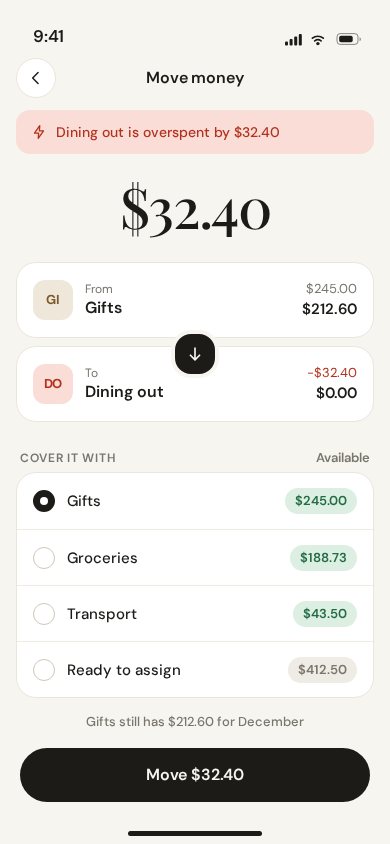
Envelope is a complete zero based budgeting app: welcome and category setup, sign in, a monthly budget with money ready to assign and category groups, a category with assigned, activity and available, assigning on a keypad, moving money to cover overspending, targets and quick assign, accounts and an account register, a transaction, adding and splitting transactions, reconciling with a confirmation, spending, net worth and age of money reports, search, scheduled transactions, notifications, a membership plan, profile and settings. Warm paper and ink with one vermilion accent.
| Detail | Value |
|---|---|
| Screen type | Form |
| App | Envelope: Give every dollar a job |
| Category | Finance |
| Design language | Minimal, light |
| Type | Playfair Display for headings, DM Sans for text |
| Colours | #f7f5f0 background, #ffffff surface, #1c1b18 text, #7a766d text-muted, #e2552d accent, #ffffff accent-contrast, #1c1b18 secondary, #ebe6dc border, #c8392b danger |
What this screen says
- Move money
- Dining out is overspent by $32.40
- GI
- From
- Gifts
- DO
- To
- Dining out
- Cover it with
- Available
- Groceries
- Transport
- Ready to assign
- Gifts still has $212.60 for December
- Move $32.40
Around it in Envelope
More form and input screens
- Divvy New group: Split bills with friends
- Ticker Order ticket: Stock investing
- Burrow New pot: Shared savings pots
- Remit Send money: International money transfer
- Piggy Add to jar: Pocket money for kids
- Settle Top up: Bill payments and banking
- Fathom Verify identity: Crypto wallet
- Marigold Verify identity: Mobile banking
- Zentra Swap: Crypto trading
- Payday Run payroll: Payroll for small teams
- Roundup Pick a mix: Invest your spare change
- Recur Cancel: Track and cancel subscriptions
What makes a good form screen
- Ask only what you need. Every field is a reason to stop. Remove optional fields or move them to later.
- Labels above fields. Visible labels stay readable while people type; placeholder-only labels disappear.
- Use the right keyboard and input. Number pads for amounts, email keyboards for email, pickers for dates and autofill for addresses and codes.
- Validate as people go. Show problems next to the field when people leave it, in words that say how to fix them.
The full form screen guide and every example
Remix Envelope free: describe your own app and it is drawn in this design. Or get its files from $10: Figma, React Native, SwiftUI, Flutter and HTML.