Templates · Search and explore screens · Education app · Encore
Encore Search screen
A search screen from Encore, a creator courses app template in a Dark-first style. Screen 8 of 25.
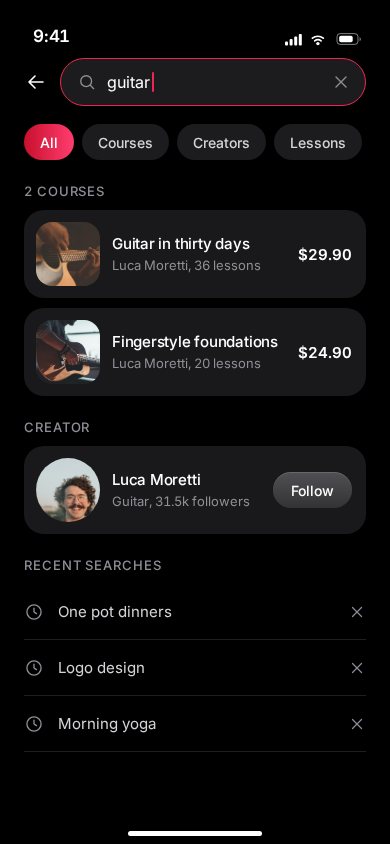
Encore is a complete creator course marketplace: welcome, sign in, a verification code, interests, a feed with a featured course and continue watching, explore, search, categories, a course page with chapters, the lesson player, reviews, creators and creator profiles, subscription plans, checkout, a confirmation, my courses, downloads, a saved list, learning progress, a certificate, purchases, account and settings. Pure black with a single crimson to pink gradient and plenty of photography.
| Detail | Value |
|---|---|
| Screen type | Search |
| App | Encore: Creator courses |
| Category | Education |
| Design language | Dark-first, dark |
| Type | Inter |
| Colours | #000000 background, #1a1a1c surface, #ffffff text, #8f8f97 text-muted, #ee2752 accent, #ffffff accent-contrast, #3a3a3e secondary, #2a2a2e border, #ff5a4d danger |
What this screen says
- guitar
- All Courses Creators Lessons
- 2 courses
- Guitar in thirty days
- Luca Moretti, 36 lessons
- Fingerstyle foundations
- Luca Moretti, 20 lessons
- Creator
- Luca Moretti
- Guitar, 31.5k followers
- Follow
- Recent searches
- One pot dinners
- Logo design
- Morning yoga
Around it in Encore
More search and explore screens
- Skim Discover: Speed reading trainer
- Terra Explore: Geography and flags quiz
- Gambit Openings: Chess training
- Buzzer Categories: Live trivia
- Parla Dictionary: Language learning
- Recall Shared decks: Flashcards and spaced repetition
- Numo Practice: Kids maths game
- Syntax Snippets: Learn to code
- Tuckin Search: Bedtime stories for kids
- Zenith Search: Night sky guide
- Chalk Search: Design courses
- Studyhall Explore: Free lessons and practice for school
Every education app search screen
What makes a good search screen
- Show something before people type. Recent searches, popular items or categories make the empty search screen useful and save typing.
- Suggest as people type. Autocomplete with matching items, not only matching words, lets people jump straight to a result.
- Make filters visible and reversible. Show active filters as chips that can be removed in one tap, and the number of results as filters change.
- Forgive typos. Close matches and "Did you mean" stop a spelling mistake from ending in an empty screen.
The full search screen guide and every example
Remix Encore free: describe your own app and it is drawn in this design. Or get its files from $10: Figma, React Native, SwiftUI, Flutter and HTML.