Templates · Form and input screens · Social app · Duo
Duo Love note screen
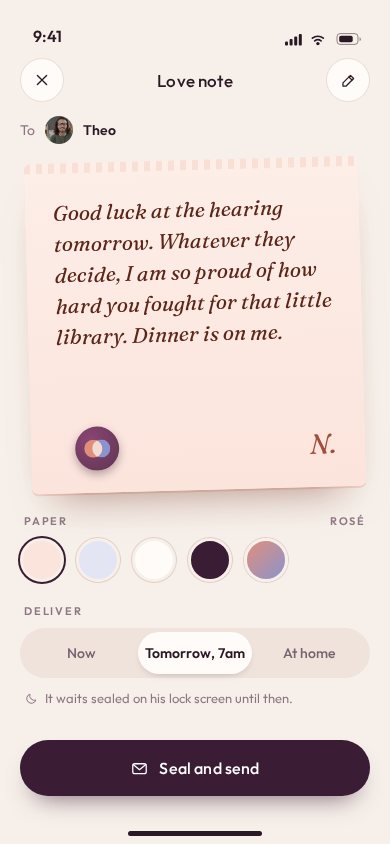
A form screen from Duo, a social app template in a Luxury style. Screen 17 of 25.
Duo is a complete app for two: welcome, pairing with an invite code and sign in, a home with your days together, today's question and both moods, the question and both answers, a shared calendar that finds when you are both free, date ideas you both matched, an idea, planning a date, booking a table and the confirmation, live meet up tracking, memories and a single memory, an animated year recap, a love note, insights, milestones, a bucket list, a shared date fund, a membership plan, notifications, your couple profile and settings. Porcelain, aubergine, rosé and dusk.
| Detail | Value |
|---|---|
| Screen type | Form |
| App | Duo: An app for two |
| Category | Social |
| Design language | Luxury, light |
| Type | Fraunces for headings, Outfit for text |
| Colours | #f7f0ea background, #fffbf8 surface, #2a1825 text, #8c7682 text-muted, #3a1c34 accent, #ffffff accent-contrast, #e08f7b secondary, #ecdcd2 border, #c4553f danger |
What this screen says
- Love note
- To
- Theo
- Good luck at the hearing tomorrow. Whatever they decide, I am so proud of how hard you fought for that little...
- N.
- Paper Rosé
- Deliver
- Now Tomorrow, 7am At home
- It waits sealed on his lock screen until then.
- Seal and send
Around it in Duo
More form and input screens
- Chirp Your profile: Messenger with file sharing
- Banter Set up profile: Live messenger
- Natter New contact: Minimal messenger
- Nearly About you: Dating by crossed paths
- Linkup New post: Professional network and jobs
- Quorum Write answer: Questions and expert answers
- Backer New post: Support creators with memberships
- Pledge Add-ons: Back creative projects
- Civic Pin location: Report issues and city services
- Guild Create server: Community servers with voice and text chat
- Parrot Your profile: Private messaging, groups and calls
- Carrier New channel: Cloud messaging with channels
What makes a good form screen
- Ask only what you need. Every field is a reason to stop. Remove optional fields or move them to later.
- Labels above fields. Visible labels stay readable while people type; placeholder-only labels disappear.
- Use the right keyboard and input. Number pads for amounts, email keyboards for email, pickers for dates and autofill for addresses and codes.
- Validate as people go. Show problems next to the field when people leave it, in words that say how to fix them.
The full form screen guide and every example
Remix Duo free: describe your own app and it is drawn in this design. Or get its files from $10: Figma, React Native, SwiftUI, Flutter and HTML.