Templates · List and feed screens · Social app · Duo
Duo Memories screen
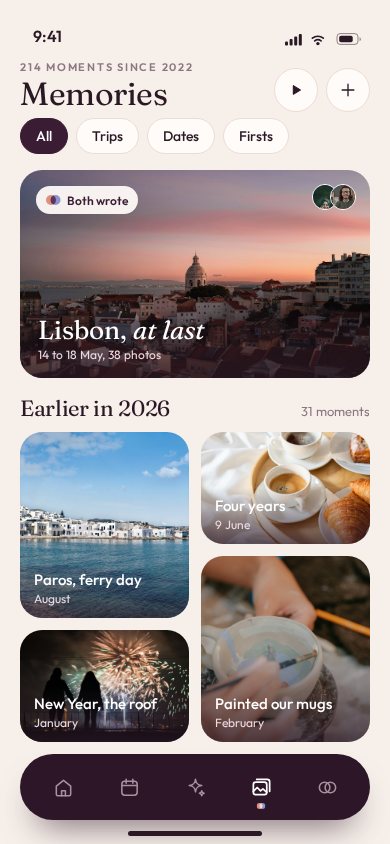
A list screen from Duo, a social app template in a Luxury style. Screen 14 of 25.
Duo is a complete app for two: welcome, pairing with an invite code and sign in, a home with your days together, today's question and both moods, the question and both answers, a shared calendar that finds when you are both free, date ideas you both matched, an idea, planning a date, booking a table and the confirmation, live meet up tracking, memories and a single memory, an animated year recap, a love note, insights, milestones, a bucket list, a shared date fund, a membership plan, notifications, your couple profile and settings. Porcelain, aubergine, rosé and dusk.
| Detail | Value |
|---|---|
| Screen type | List |
| App | Duo: An app for two |
| Category | Social |
| Design language | Luxury, light |
| Type | Fraunces for headings, Outfit for text |
| Colours | #f7f0ea background, #fffbf8 surface, #2a1825 text, #8c7682 text-muted, #3a1c34 accent, #ffffff accent-contrast, #e08f7b secondary, #ecdcd2 border, #c4553f danger |
What this screen says
- 214 moments since 2022
- Memories
- All Trips Dates Firsts
- Both wrote
- Lisbon, at last
- 14 to 18 May, 38 photos
- Earlier in 2026
- 31 moments
- Paros, ferry day
- August
- New Year, the roof
- January
- Four years
- 9 June
- Painted our mugs
- February
Around it in Duo
More list and feed screens
- Ripple Replies: Voice notes social
- Soapbox Takes: Weekly debates and polls
- Ballot Voters: Settle it on paper
- Murmur Chats: Chat rooms for art lovers
- Wink Likes: Video first dating
- Snoot Places: Social app for pets
- Huddle Notifications: Interest groups and meetups
- Glade Comments: Photo and clip social network
- Onair Notifications: Live streaming
- Drift Comments: Reels and voice rooms
- Glitz Live now: Party live streaming
- Hearth Shared album: Messenger for trips and circles
What makes a good list screen
- Show what people need to decide. Each row should carry just enough to choose: a title, one or two details and a status. Everything else belongs on the detail screen.
- Keep rows consistent. The same information in the same place on every row lets people scan down a column instead of reading each item.
- Group with headings. Dates, categories or status headings break long lists into chunks people can skip through.
- Make common actions quick. Swipe actions, a checkbox or a heart on the row save opening the item for small tasks.
The full list screen guide and every example
Remix Duo free: describe your own app and it is drawn in this design. Or get its files from $10: Figma, React Native, SwiftUI, Flutter and HTML.