Templates · Paywall screens · Lifestyle app · Drape
Drape Plus screen
A paywall screen from Drape, an AI wardrobe and daily outfits app template in a Minimal style. Screen 23 of 25.
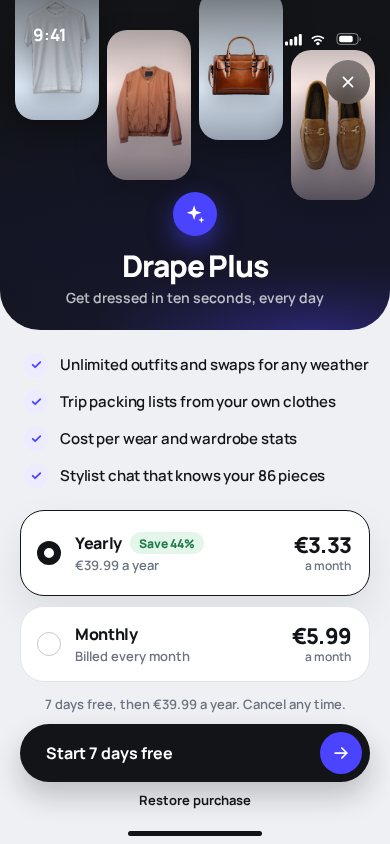
Drape is a complete AI wardrobe app: a style quiz, sizes and sign in, an outfit of the day built for the weather and the calendar, piece by piece swaps, a wardrobe grid by category, item pages with wears and cost per wear, a camera that detects and tags a garment, saved outfits and a builder, a week planner, trip packing, occasion picks, a stylist chat, stats, declutter, shopping gaps, inspiration, a paywall, profile and settings. Pale grey and white with ink and electric indigo, garments as true cut-outs on tinted tiles.
| Detail | Value |
|---|---|
| Screen type | Paywall |
| App | Drape: AI wardrobe and daily outfits |
| Category | Lifestyle |
| Design language | Minimal, light |
| Type | Manrope |
| Colours | #eef0f3 background, #ffffff surface, #121417 text, #6b7280 text-muted, #4a43ff accent, #ffffff accent-contrast, #dbe6f2 secondary, #e1e4ea border, #d9483b danger |
What this screen says
- Drape Plus
- Get dressed in ten seconds, every day
- Unlimited outfits and swaps for any weather
- Trip packing lists from your own clothes
- Cost per wear and wardrobe stats
- Stylist chat that knows your 86 pieces
- YearlySave 44%
- €39.99 a year
- €3.33a month
- Monthly
- Billed every month
- €5.99a month
- 7 days free, then €39.99 a year. Cancel any time.
- Start 7 days free
- Restore purchase
Around it in Drape
More paywall screens
- Lendly Plus: Borrow things from neighbours
- Stub Plus: Fan to fan ticket resale
- Trove Plus: Visual ideas and boards
- Vidi Plus: Video platform for creators
- Roll Plus: Photo library and backups
- Splice Pro: Video editor for short clips
- Blush Plus: Beauty and makeup shopping
- Flatpack Plus: Furniture store with room previews
- Column Subscribe: Newsletters and independent writers
- Fetch Plus: Dog walkers and pet sitters
- Forecourt Cover: Buy and sell used cars
- Tower Plans: Mobile plan, data and bills
Every lifestyle app paywall screen
What makes a good paywall screen
- Lead with the outcome, not the feature list. The headline should say what changes for the person: "Train smarter every week" beats "Unlock Premium". Three to five benefits underneath are enough; more turns into a wall of ticks nobody reads.
- Show the real price, period and trial terms. State the price, how often it renews and when a free trial turns into a charge, near the button. Apple's App Store guideline 3.1.2 asks subscription apps to make this clear before purchase, and Google Play has similar rules.
- One primary button. The main call to action should be impossible to miss and say what happens: "Start 7-day free trial" or "Subscribe for $4.99/month". A second plan choice is fine; a second competing button is not.
- Make the plans easy to compare. When you offer monthly and yearly, show both prices in the same unit (per month or per week) and mark the saving on the yearly plan in plain numbers, not just a badge.
The full paywall screen guide and every example
Remix Drape free: describe your own app and it is drawn in this design. Or get its files from $10: Figma, React Native, SwiftUI, Flutter and HTML.