Templates · Live tracking screens · Lifestyle app · Dorm
Dorm Commute screen
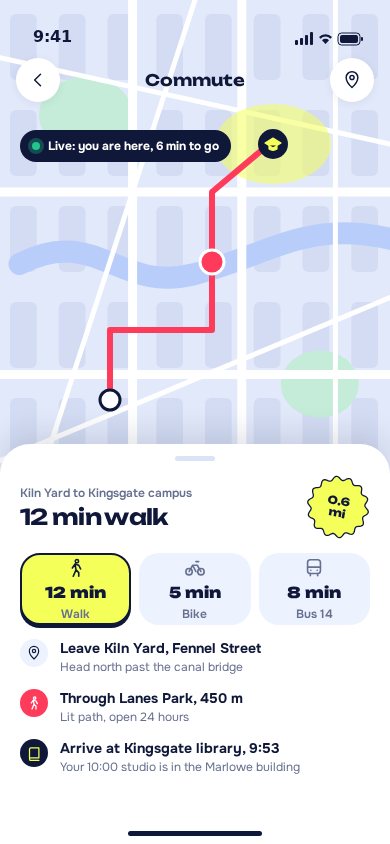
A tracking screen from Dorm, a find student housing app template in a Gen Z style. Screen 11 of 25.
Dorm is a complete student housing app: welcome, pick your university, sign in, a home that picks up your application, search with filters, a price pin map, a property page with room types, amenities and commute times, a room page with a floor plan, a virtual tour, a commute planner, compare, saved places, a three step application, deposit checkout and a booking confirmed key fob, flatmate matching and a flatmate profile, chat with the property team, payments, a move in checklist, Dorm Plus, notifications, profile and settings. Sky milk and white with cherry, lemon, lilac and ink.
| Detail | Value |
|---|---|
| Screen type | Tracking |
| App | Dorm: Find student housing |
| Category | Lifestyle |
| Design language | Gen Z, light |
| Type | Unbounded for headings, Onest for text |
| Colours | #edf2ff background, #ffffff surface, #10183a text, #66708f text-muted, #ff3b5c accent, #ffffff accent-contrast, #f4ff5a secondary, #dbe3f6 border, #22c58b success, #c9b8ff tertiary |
What this screen says
- Commute
- Live: you are here, 6 min to go
- Kiln Yard to Kingsgate campus
- 12 min walk
- mi
- 12 minWalk
- 5 minBike
- 8 minBus 14
- Leave Kiln Yard, Fennel StreetHead north past the canal bridge
- Through Lanes Park, 450 mLit path, open 24 hours
- Arrive at Kingsgate library, 9:53Your 10:00 studio is in the Marlowe building
Around it in Dorm
More live tracking screens
- Laced Track order: Sneaker drops and raffles
- Drizzle Radar: Weather with living skies
- Byline Live updates: Daily news reader
- Shelf Reading timer: Reading tracker and book club
- Handy Track pro: Home services
- Tasker On the way: Book and do local odd jobs
- Toolbox Store map: Hardware store and project lists
- Kibble Track order: Pet supplies and autoship
- Guardrail Location: Parental controls and screen time
- Collar Live: GPS pet tracker
- Postage Live: Send parcels and find drop-off points
- Specs Order tracking: Glasses with virtual try-on
Every lifestyle app tracking screen
What makes a good live tracking screen
- The live number is the hero. Arrival time, pace, distance or time left, in large type at the top or centre.
- Show status in words. "Driver is 3 minutes away" or "Halfway there" alongside the map or chart.
- Make it readable while moving. Large numbers, high contrast and big buttons for pause, stop or call.
- Keep updates calm. Smooth movement on the map and steady numbers; jumpy updates feel broken.
The full live tracking screen guide and every example
Remix Dorm free: describe your own app and it is drawn in this design. Or get its files from $10: Figma, React Native, SwiftUI, Flutter and HTML.