Templates · List and feed screens · Lifestyle app · Doorstep
Doorstep Inbox screen
A list screen from Doorstep, a homes for sale and rent app template in an Enterprise style. Screen 19 of 25.
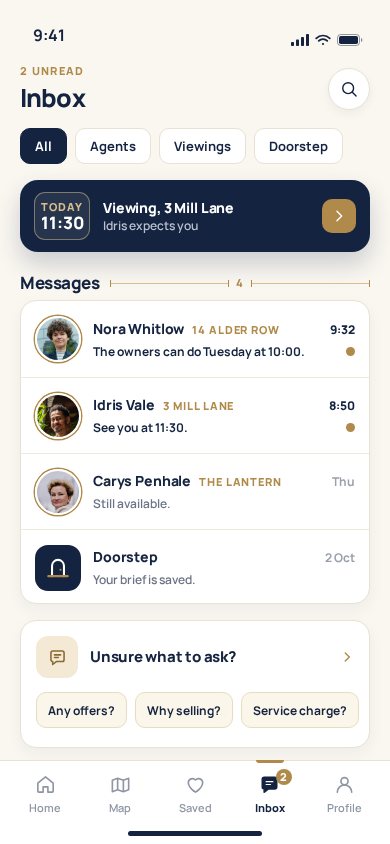
Doorstep is a complete property search app: welcome, sign in and a search brief, a home with new matches and viewings, map search with price pins, filters and results, a listing with gallery, drawn floor plan and area price trends, a mortgage calculator, booking a viewing, saved homes, search alerts, agent chat and profiles, a Plus plan, notifications and settings. Warm white with navy, brass hairlines and architect's dimension marks.
| Detail | Value |
|---|---|
| Screen type | List |
| App | Doorstep: Homes for sale and rent |
| Category | Lifestyle |
| Design language | Enterprise, light |
| Type | Manrope |
| Colours | #faf7f1 background, #ffffff surface, #14233f text, #6b7385 text-muted, #14233f accent, #ffffff accent-contrast, #b08a4a secondary, #e8e1d4 border, #b8483a danger |
What this screen says
- 2 unread
- Inbox
- All Agents Viewings Doorstep
- TODAY11:30
- Viewing, 3 Mill Lane
- Idris expects you
- Messages4
- Nora Whitlow14 Alder Row9:32
- The owners can do Tuesday at 10:00.
- Idris Vale3 Mill Lane8:50
- See you at 11:30.
- Carys PenhaleThe LanternThu
- Still available.
- Doorstep2 Oct
- Your brief is saved.
- Unsure what to ask?
- Any offers? Why selling? Service charge?
- Home
- Map
- Saved
- 2 Inbox
- Profile
Around it in Doorstep
More list and feed screens
- Hem Orders: Tailoring and alterations, collected
- Lendly Party gear: Borrow things from neighbours
- Stub Listings: Fan to fan ticket resale
- Trove Boards: Visual ideas and boards
- Vidi Comments: Video platform for creators
- Roll Albums: Photo library and backups
- Splice Add media: Video editor for short clips
- Blush Lipstick: Beauty and makeup shopping
- Flatpack Room: Furniture store with room previews
- Column Comments: Newsletters and independent writers
- Fetch Sitters: Dog walkers and pet sitters
- Forecourt Results: Buy and sell used cars
Every lifestyle app list screen
What makes a good list screen
- Show what people need to decide. Each row should carry just enough to choose: a title, one or two details and a status. Everything else belongs on the detail screen.
- Keep rows consistent. The same information in the same place on every row lets people scan down a column instead of reading each item.
- Group with headings. Dates, categories or status headings break long lists into chunks people can skip through.
- Make common actions quick. Swipe actions, a checkbox or a heart on the row save opening the item for small tasks.
The full list screen guide and every example
Remix Doorstep free: describe your own app and it is drawn in this design. Or get its files from $10: Figma, React Native, SwiftUI, Flutter and HTML.