Templates · Form and input screens · Productivity app · Dispatch
Dispatch Checklist screen
A form screen from Dispatch, a field service jobs for technicians app template in an Enterprise style. Screen 11 of 25.
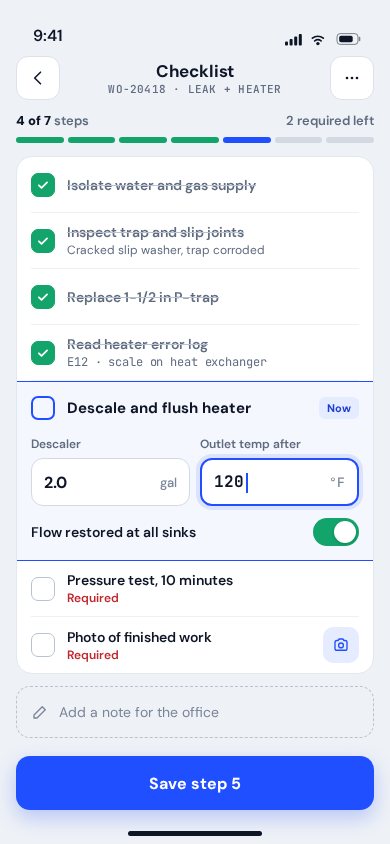
Dispatch is a complete field service app for technicians: welcome and company sign in, a today screen with the day's route spine, jobs, search, a work order ticket, the customer and their equipment, live navigation to the next stop, an on site job clock, a checklist, photo capture with markup, van stock, an invoice, customer sign off and a closed job. Then the week schedule, dispatch messages, performance, a timesheet, follow up jobs, notifications, a team plan, profile and settings. Cool grey, white tickets, deep ink and cobalt.
| Detail | Value |
|---|---|
| Screen type | Form |
| App | Dispatch: Field service jobs for technicians |
| Category | Productivity |
| Design language | Enterprise, light |
| Type | DM Sans |
| Colours | #eef1f6 background, #ffffff surface, #0d1526 text, #5f6b7f text-muted, #1f4fff accent, #ffffff accent-contrast, #12a46b secondary, #dde2ea border, #e5484d danger |
What this screen says
- ChecklistWO-20418 · LEAK + HEATER
- 4 of 7 steps 2 required left
- Isolate water and gas supply
- Inspect trap and slip joints
- Cracked slip washer, trap corroded
- Replace 1-1/2 in P-trap
- Read heater error log
- E12 · scale on heat exchanger
- Descale and flush heater
- Now
- Descaler
- 2.0gal
- Outlet temp after
- 120 °F
- Flow restored at all sinks
- Pressure test, 10 minutes
- Required
- Photo of finished work
- Add a note for the office
- Save step 5
Around it in Dispatch
More form and input screens
- Postbox Compose: Email for busy teams
- Daybook New event: Calendar and planner
- Scanly Sign: Document scanner
- Keyring New item: Password manager
- Rota Swap shift: Shift scheduling for hourly teams
- Inkwell Write: Daily journal
- Shortlist Filters: Job search and application tracker
- Parley Create group: Team messenger
- Docket New task: Task and sprint planner
- Kanso New task: Tasks, calendar and chat
- Margin Edit note: AI note taking
- Aide Command: Executive AI assistant
Every productivity app form screen
What makes a good form screen
- Ask only what you need. Every field is a reason to stop. Remove optional fields or move them to later.
- Labels above fields. Visible labels stay readable while people type; placeholder-only labels disappear.
- Use the right keyboard and input. Number pads for amounts, email keyboards for email, pickers for dates and autofill for addresses and codes.
- Validate as people go. Show problems next to the field when people leave it, in words that say how to fix them.
The full form screen guide and every example
Remix Dispatch free: describe your own app and it is drawn in this design. Or get its files from $10: Figma, React Native, SwiftUI, Flutter and HTML.