Templates · Dashboard and stats screens · Fitness app · Dew
Dew Progress screen
A dashboard screen from Dew, an AI skin scan and routine app template in a Clinical style. Screen 20 of 25.
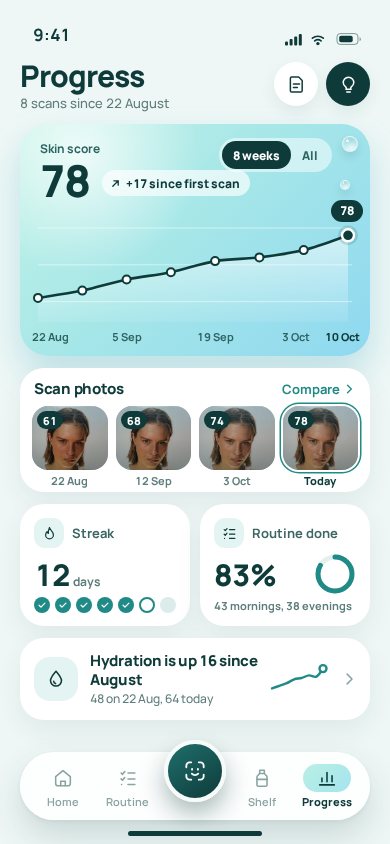
Dew is a complete AI skin care app: onboarding with goals and skin type, a guided face scan, a skin report with a score ring and a numbered face map, concerns in detail, a home with today's score and routine, morning and evening routines with timed steps, a routine builder, a product shelf, product pages with ingredient safety, a product scanner, conflict checks, progress with compare photos, a skin diary, insights, a membership, profile and settings. Pale aqua and white with deep teal, a dewy mint to aqua gradient and soft coral.
| Detail | Value |
|---|---|
| Screen type | Dashboard |
| App | Dew: AI skin scan and routine |
| Category | Health and fitness |
| Design language | Clinical, light |
| Type | Manrope |
| Colours | #eef7f6 background, #ffffff surface, #0e3b3a text, #6b8a88 text-muted, #0e3b3a accent, #ffffff accent-contrast, #9fe4e6 secondary, #dcecea border, #ff8f7a danger |
What this screen says
- Progress
- 8 scans since 22 August
- Skin score
- +17 since first scan
- 8 weeksAll
- 22 Aug
- 5 Sep
- 19 Sep
- 3 Oct
- 10 Oct
- Scan photosCompare
- 12 Sep
- Today
- Streak
- 12days
- Routine done
- 43 mornings, 38 evenings
- Hydration is up 16 since August
- 48 on 22 Aug, 64 today
- Home
- Routine
- Shelf
Around it in Dew
More dashboard and stats screens
- Pace Activity: Fitness tracker
- Flexpass Activity: One membership, many studios
- Clinic Care overview: Find and book doctors
- Careline This month: Care for an ageing parent
- Velo Summary: Live and on-demand indoor cycling
- Vantage Energy reserve: Sports watch companion
- Labwork Report: Book blood tests and see results
- Segment Progress: Runs and rides with friends
- Nightly Sleep: Smart ring sleep and readiness
- Pillbox Week: Pharmacy refills and medicine reminders
- Rise Trends: Alarm clock and sleep cycles
- Ward Trend: Patient portal for results, visits and messages
Every fitness app dashboard screen
What makes a good dashboard screen
- One headline number. The figure that matters most, like balance, steps or revenue, large at the top with its change since the last period.
- Give numbers context. Compared with last week, against a goal or as a trend line. A number alone does not say if it is good.
- Pick simple charts. Bars for comparing periods, lines for trends and rings for progress toward a goal. Avoid charts that need a legend to read.
- Let people change the period. Day, week, month and year as a segmented control above the chart.
The full dashboard screen guide and every example
Remix Dew free: describe your own app and it is drawn in this design. Or get its files from $10: Figma, React Native, SwiftUI, Flutter and HTML.