Templates · Dashboard and stats screens · Smart home app · Decibel
Decibel Listening screen
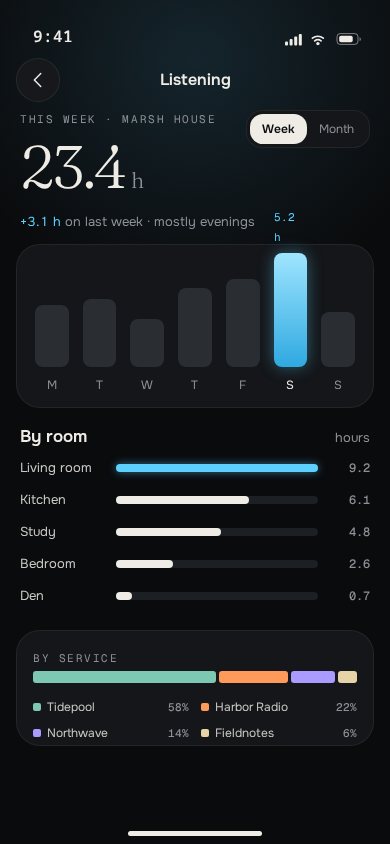
A dashboard screen from Decibel, a multi-room speakers app template in a Luxury style. Screen 21 of 25.
Decibel is a complete multi-room speaker app: welcome, sign in, a rooms home with what plays where, a room with its speakers, now playing with a brushed aluminium volume dial, grouping rooms with a volume for each, the queue, browse across music services, search, an album, services, sound and EQ, room tuning with a live response curve and its result, alarms, a new alarm, a sleep timer, adding a speaker from discovery to ready, listening stats, a premium plan, notifications, account and system settings. Obsidian and graphite with brushed aluminium and an ice cyan light.
| Detail | Value |
|---|---|
| Screen type | Dashboard |
| App | Decibel: Multi-room speakers |
| Category | Smart home |
| Design language | Luxury, dark |
| Type | Fraunces for headings, Onest for text |
| Colours | #0a0b0d background, #141619 surface, #efece6 text, #8d9097 text-muted, #5cd0ff accent, #0a0b0d accent-contrast, #d8dbdf secondary, #26292e border, #ff5d5d danger |
What this screen says
- Listening
- This week · Marsh house 23.4 h
- +3.1 h on last week · mostly evenings
- Week Month
- 5.2 hS
- By room
- hours
- Living room
- Kitchen
- Study
- Bedroom
- Den
- By service
- Tidepool58% Harbor Radio22% Northwave14% Fieldnotes6%
Around it in Decibel
More dashboard and stats screens
- Latch Insights: Smart locks and guest access
- Mesh Topology: Home Wi-Fi network
- Nursery Room: Baby monitor camera and sleep
- Porch Insights: Home security cameras
- Sundial Forecast: Solar panels and home battery
- Puddle Weather: Garden watering and sprinklers
- Upkeep Costs: Home maintenance calendar
- Kelvin Air quality: Climate and thermostat
- Glow Insights: Light scenes and colour
- Tagged Coverage: Home inventory for insurance
- Lobby Building status: Apartment building app
- Sweep Stats: Robot vacuum and mop
Every smart home app dashboard screen
What makes a good dashboard screen
- One headline number. The figure that matters most, like balance, steps or revenue, large at the top with its change since the last period.
- Give numbers context. Compared with last week, against a goal or as a trend line. A number alone does not say if it is good.
- Pick simple charts. Bars for comparing periods, lines for trends and rings for progress toward a goal. Avoid charts that need a legend to read.
- Let people change the period. Day, week, month and year as a segmented control above the chart.
The full dashboard screen guide and every example
Remix Decibel free: describe your own app and it is drawn in this design. Or get its files from $10: Figma, React Native, SwiftUI, Flutter and HTML.