Templates · Detail screens · Education app · Cram
Cram Subject screen
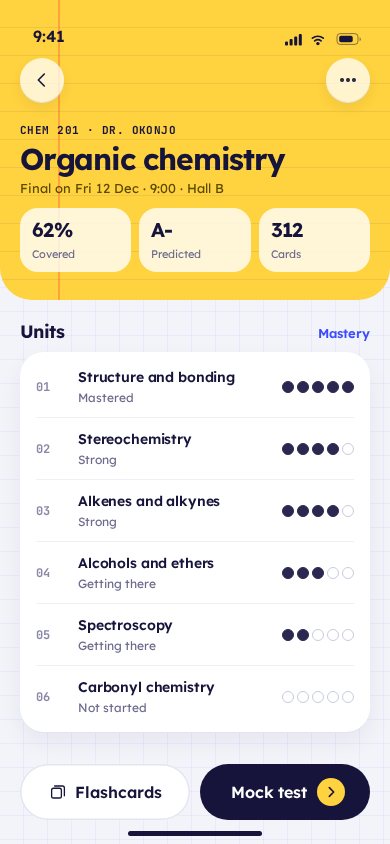
A detail screen from Cram, an exam prep and mock tests app template in a Gen Z style. Screen 6 of 25.
Cram is a complete exam prep app: welcome, pick your exam, sign up, a home with the exam countdown, a predicted grade and today's plan, subjects with unit mastery, search, index card flashcards, a new card form, mock tests with a brief, a timed question with bubble sheet answers, the answer sheet, results with a red pen grade, a topic breakdown, a worked explanation, stats, a study plan, a focus timer, a study squad leaderboard, Cram Plus with checkout, notifications, profile and settings. Graph paper and ink navy with pencil yellow, eraser pink and red pen.
| Detail | Value |
|---|---|
| Screen type | Detail |
| App | Cram: Exam prep and mock tests |
| Category | Education |
| Design language | Gen Z, light |
| Type | Lexend |
| Colours | #f3f4fa background, #ffffff surface, #16143a text, #6d6b8c text-muted, #ffd23f accent, #16143a accent-contrast, #3d4bff secondary, #e3e4f0 border, #ff4a3d danger |
What this screen says
- CHEM 201 · DR. OKONJO
- Organic chemistry
- Final on Fri 12 Dec · 9:00 · Hall B
- 62%Covered
- A-Predicted
- 312Cards
- Units
- Mastery
- Structure and bonding
- Mastered
- Stereochemistry
- Strong
- Alkenes and alkynes
- Alcohols and ethers
- Getting there
- Spectroscopy
- Carbonyl chemistry
- Not started
- Flashcards
- Mock test
Around it in Cram
More detail screens
- Lexis Word: A word a day
- Quanta Mechanics: Interactive physics lessons
- Quad Class: University campus app
- Palm Unit: Learn sign language
- Epoch Era: History on a timeline
- Wren Book: Early reading for kids
- Proof Working: Maths tutor that shows its working
- Skim Book: Speed reading trainer
- Terra Portugal: Geography and flags quiz
- Gambit Daily puzzle: Chess training
- Buzzer Daily quiz: Live trivia
- Homeroom Timetable: School, all on one page
Every education app detail screen
What makes a good detail screen
- Lead with what identifies the item. A large image or title, the price or status, and the key facts at the top. People should know they are in the right place at a glance.
- Keep the main action visible. A sticky bottom button for Add to cart, Book or Play stays reachable while people scroll through details.
- Order information by importance. The facts that decide the choice come first; reviews, specifications and fine print further down.
- Use progressive disclosure. Long descriptions, specifications and policies can expand on tap rather than filling the screen.
The full detail screen guide and every example
Remix Cram free: describe your own app and it is drawn in this design. Or get its files from $10: Figma, React Native, SwiftUI, Flutter and HTML.