Templates · List and feed screens · Food app · Courier
Courier Schedule screen
A list screen from Courier, a food delivery driver app template in a Playful style. Screen 19 of 25.
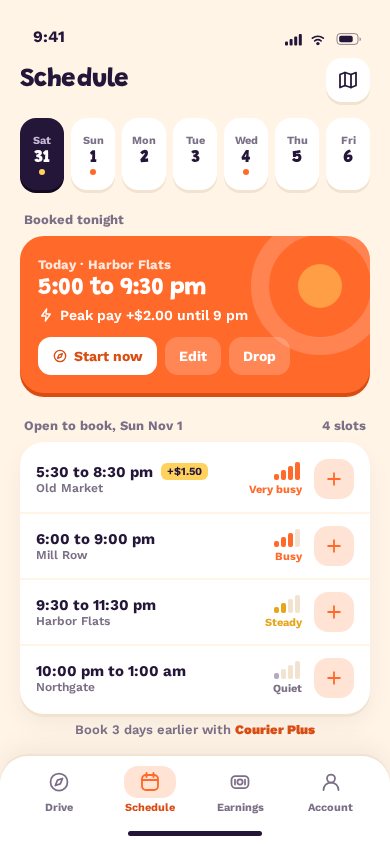
Courier is a complete delivery driver app: welcome, vehicle, sign in and a code, a home map with today's pay and a start button, zones, waiting online, an incoming offer with a countdown, driving to the restaurant, a pickup checklist, driving to the customer, chat, a drop-off photo and a delivered screen, earnings with a weekly chart, past deliveries, cash out, schedule, hotspots, ratings, a Plus plan, notifications, profile and settings. Cream and white with tangerine, plum ink and mint.
| Detail | Value |
|---|---|
| Screen type | List |
| App | Courier: Food delivery driver app |
| Category | Food |
| Design language | Playful, light |
| Type | Grandstander for headings, Work Sans for text |
| Colours | #fff4e6 background, #ffffff surface, #241638 text, #7b6f86 text-muted, #ff6a2b accent, #ffffff accent-contrast, #16b37c secondary, #f1e3d0 border, #e8384f danger |
What this screen says
- Schedule
- Sat 31
- Sun 1
- Mon 2
- Tue 3
- Wed 4
- Thu 5
- Fri 6
- Booked tonight
- Today · Harbor Flats5:00 to 9:30 pm
- Peak pay +$2.00 until 9 pm
- Start now Edit Drop
- Open to book, Sun Nov 1 4 slots
- 5:30 to 8:30 pm+$1.50Old Market
- Very busy
- 6:00 to 9:00 pmMill Row
- Busy
- 9:30 to 11:30 pmHarbor Flats
- Steady
- 10:00 pm to 1:00 amNorthgate
- Quiet
- Book 3 days earlier with Courier Plus
- Drive
- Earnings
- Account
Around it in Courier
More list and feed screens
- Corked Notifications: Wine journal and cellar
- Crumb Menu: Neighbourhood bakery
- Tiffin Restaurants: Food delivery
- Picker Shop list: Grocery shopper app
- Queue Drinks: Join the waitlist from anywhere
- Nosh Menu: Local restaurant reviews
- Buns Deals: Burger chain ordering and deals
- Slice Menu: Pizza ordering with a live tracker
- Crate Menu: Meal kits delivered weekly
- Dash Aisle: Ten minute grocery delivery
- Aisle Weekly shop: Shared grocery lists
- Menu: Scan, order and pay at the table
What makes a good list screen
- Show what people need to decide. Each row should carry just enough to choose: a title, one or two details and a status. Everything else belongs on the detail screen.
- Keep rows consistent. The same information in the same place on every row lets people scan down a column instead of reading each item.
- Group with headings. Dates, categories or status headings break long lists into chunks people can skip through.
- Make common actions quick. Swipe actions, a checkbox or a heart on the row save opening the item for small tasks.
The full list screen guide and every example
Remix Courier free: describe your own app and it is drawn in this design. Or get its files from $10: Figma, React Native, SwiftUI, Flutter and HTML.