Templates · Form and input screens · Travel app · Contrail
Contrail Seats screen
A form screen from Contrail, a travel app template in a Glass style. Screen 9 of 25.
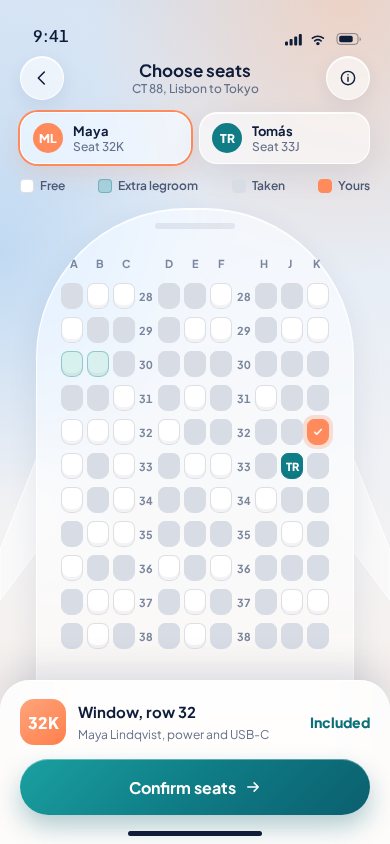
Contrail is a complete airline app: welcome, sign in, a home with tomorrow's flight and open check-in, booking with a fare calendar, flight results, fare families, passenger details, a seat map, meals, payment and a confirmation, trips, a booking with manage actions, online check-in, a boarding pass, live flight status with the inbound aircraft on a map, a lounge, inflight entertainment, miles and status tiers, a lounge and wifi membership, explore, notifications, profile and settings. Dawn sky glass with navy ink, teal and apricot.
| Detail | Value |
|---|---|
| Screen type | Form |
| App | Contrail: Airline booking, check-in and boarding |
| Category | Travel |
| Design language | Glass, light |
| Type | Instrument Serif for headings, Plus Jakarta Sans for text |
| Colours | #e8eef6 background, #ffffff surface, #0f1d3a text, #627089 text-muted, #0f7c86 accent, #ffffff accent-contrast, #ff8b5c secondary, #dfe5ee border, #e5484d danger |
What this screen says
- Choose seatsCT 88, Lisbon to Tokyo
- ML
- Maya
- Seat 32K
- TR
- Tomás
- Seat 33J
- Free Extra legroom Taken Yours
- A B C D E F H J K
- 33 33 TR
- 32K
- Window, row 32
- Maya Lindqvist, power and USB-C
- Included
- Confirm seats
Around it in Contrail
More form and input screens
- Omnia Rate trip: Super app for rides, food and payments
- Staya Dates: Homes and stays from local hosts
- Lodge Dates: Hotels, deals and reservations
- Fare Dates: Flight search and price alerts
- Rove Write a review: Reviews and things to do
- Ignition Driver check: Car rental from local hosts
- Keycard Check in: Hotel stays, digital key and room service
- Detour Report: Community driving navigation
- Convoy Offer a ride: Carpooling between cities
- Manifest Add plan: Trip plans from your confirmation emails
- Roadster Charge schedule: Your electric car, from your phone
- Fairground Virtual queue: Theme park tickets, wait times and map
What makes a good form screen
- Ask only what you need. Every field is a reason to stop. Remove optional fields or move them to later.
- Labels above fields. Visible labels stay readable while people type; placeholder-only labels disappear.
- Use the right keyboard and input. Number pads for amounts, email keyboards for email, pickers for dates and autofill for addresses and codes.
- Validate as people go. Show problems next to the field when people leave it, in words that say how to fix them.
The full form screen guide and every example
Remix Contrail free: describe your own app and it is drawn in this design. Or get its files from $10: Figma, React Native, SwiftUI, Flutter and HTML.